2.9 One Lever Mode (Twin Screw)
The system supports a mode of operation referred to as One Lever Mode, which allows the operator to
control both engines and transmissions with a single Control Head lever. The Port or the Starboard lever at
any Remote Station can be designated by the operator as the Master lever. The designation can be changed
by the operator at any time. Most of the features (synchronization, troll, etc.) available in normal operation are
available while operating in One Lever Mode.
• The Processor defaults to One Lever Mode disabled.
• One Lever Mode can be disabled or enabled in the Set Up Procedures.
• When One Lever Mode is enabled, the operation must be turned ON and OFF as described below.
2.9.1 Turning ON One Lever Operation
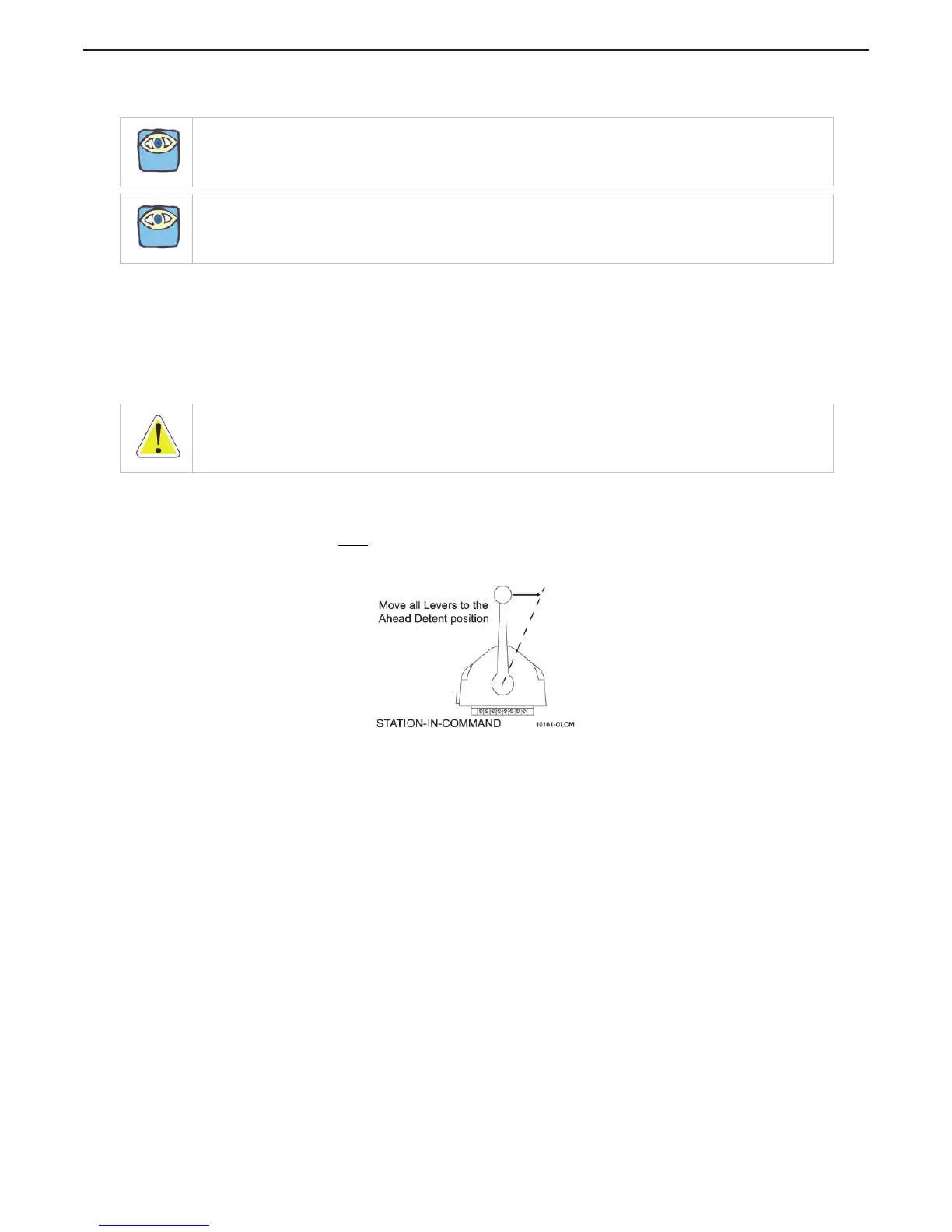
A At the Station-in-Command, move the Port and Starboard Control Head levers to the Ahead
detent.
B Depress and Hold
the transfer button while moving the Port or Starboard Control Head’s lever
out of the Ahead detent. Do Not Release the Transfer Button until the green LED turns ON,
indicating One Lever Operation is now active.
Figure 2-12: Step A) One Lever Operation Mode
• The Control Head lever which the operator chose to move out of the Ahead detent, becomes
the Master lever.
NOTE: One Lever Operation may be used in Troll Mode or in Non-Troll Mode.
NOTE: The Green LED will always be lit while in One Lever Operation, no matter what position the Master
Control Head lever is in.
WARNING: Personal Injury may result if this message is disregarded.


 To Next Page