Service Kit Installation Procedures
906-0731-04-01 Rev. C ZOLL Ventilator Service Manual 4–83
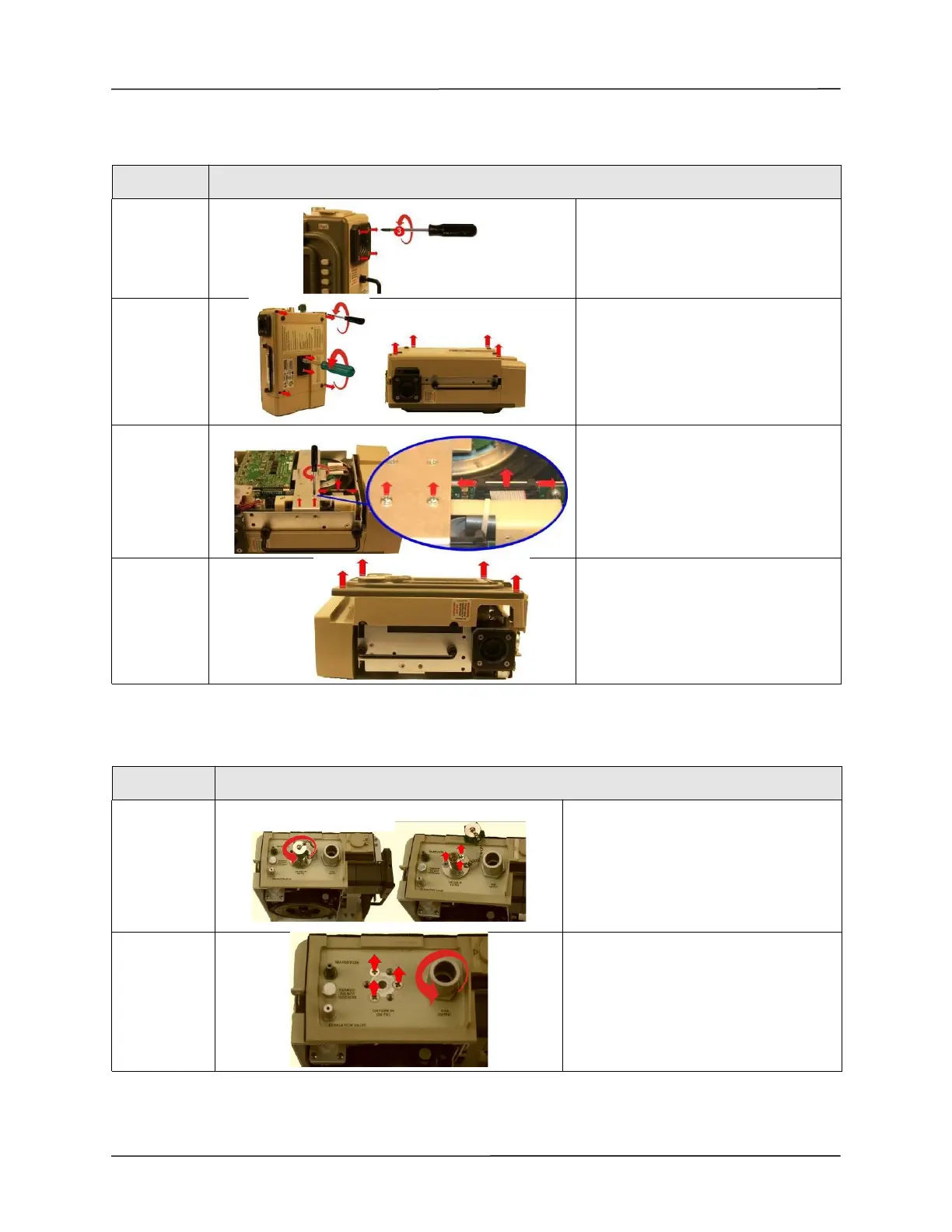
Remove the Fresh Gas/Emergency Air Intake, Back Cover and Front Case Assembly.
Remove the Connector Panel Assembly
STEP
ACTION
1
Loosen and remove the
(4) 8-32 X 3 screws on the outer air
intake. Remove the entire Fresh Gas
Emergency Air Intake assembly
including foam and disk filters.
2
Loosen and remove the (2) 10-32
Keps nuts and the (4) 6-32 X 2 screws.
Remove the back case by lifting from
the ventilator.
3
Remove the (2) 4-40 X ¼ screws on the
Dovetail Mounting Bracket and
disconnect the ribbon cable on the
PIM PCB by simultaneously applying
pressure on the two ejector latches.
4
Flip the ventilator over and remove the
front case assembly by lifting it straight
up away from the ventilator module.
STEP
ACTION
1
Remove the O2 Inlet fitting by unscrewing
the dust cap then unscrewing the (3) 8-32
X 7/16 screws. Remove and keep the O-
ring(s)
2
Loosen and remove the (3) 8-32 X ¼
screws. Loosen and remove the Gas
Output fitting using a 1-inch deep-socket
wrench. Remove and keep the O-ring(s)



 To Next Page