Service Kit Installation Procedures
906-0731-04-01 Rev. C ZOLL Ventilator Service Manual 4–43
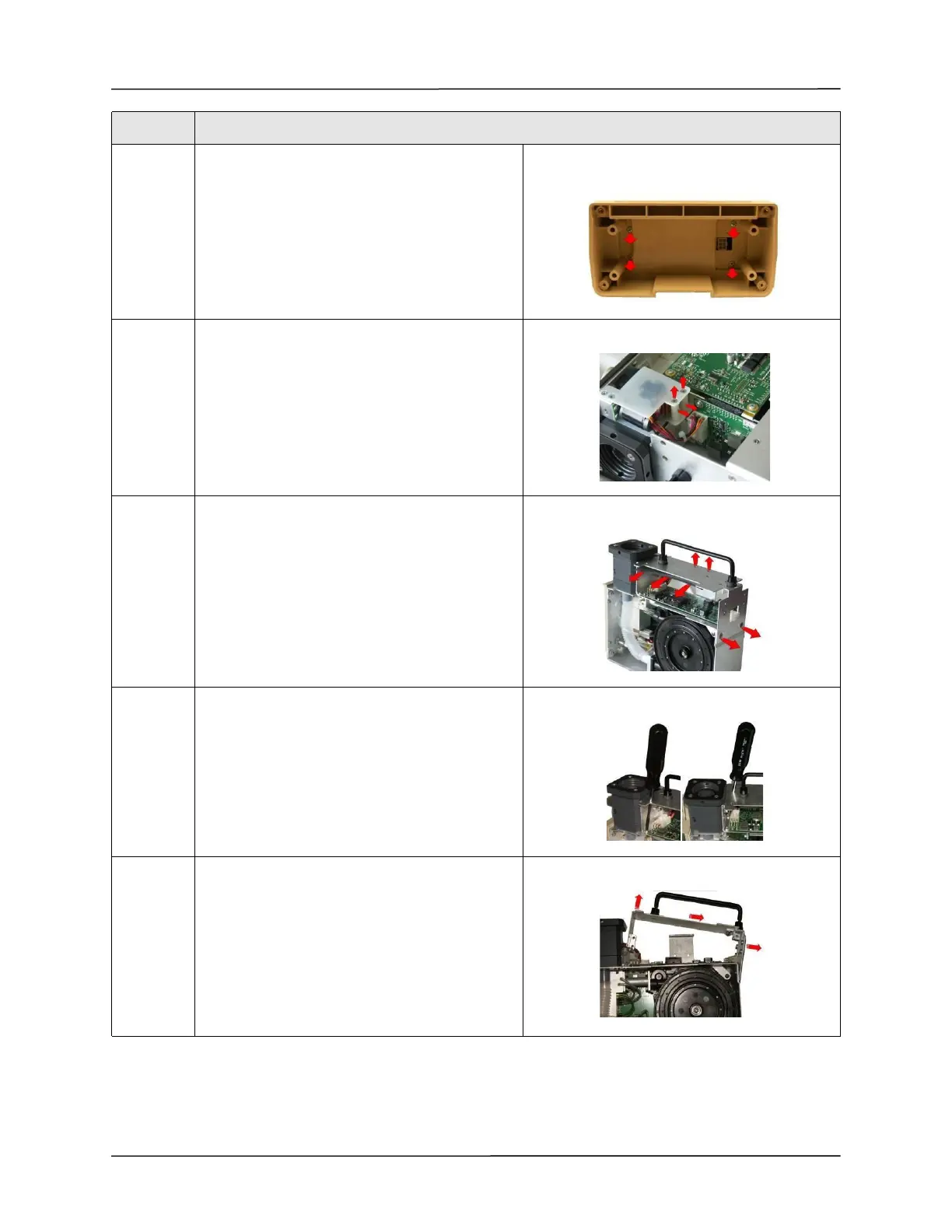
7 Unscrew the four 6-32 x 5/16 Phillips screws to
remove the battery compartment case.
Save these screws.
8 Loosen and remove the two 4-40 x 1 1/4 screws
and nylon spacers supporting the Power Input
assembly unto the chassis.
Save these screws and spacers.
9 Loosen and remove the two 6-32 x 1/4 screws
holding the chassis to the dovetail mounting
bracket and remove the SpO
2
insulator.
Loosen and remove the two 8-32 x 1/4 screws
holding the chassis to the ventilator module.
10 Insert screwdriver through the holes on the
chassis to loosen and remove the
two 6-32 x 5/16 screws holding the chassis to the
ventilator module.
11 Lift the damaged chassis from the ventilator
module.
Step Action



 To Next Page