Chapter 5 Interfaces
ZyWALL (ZLD) CLI Reference Guide
71
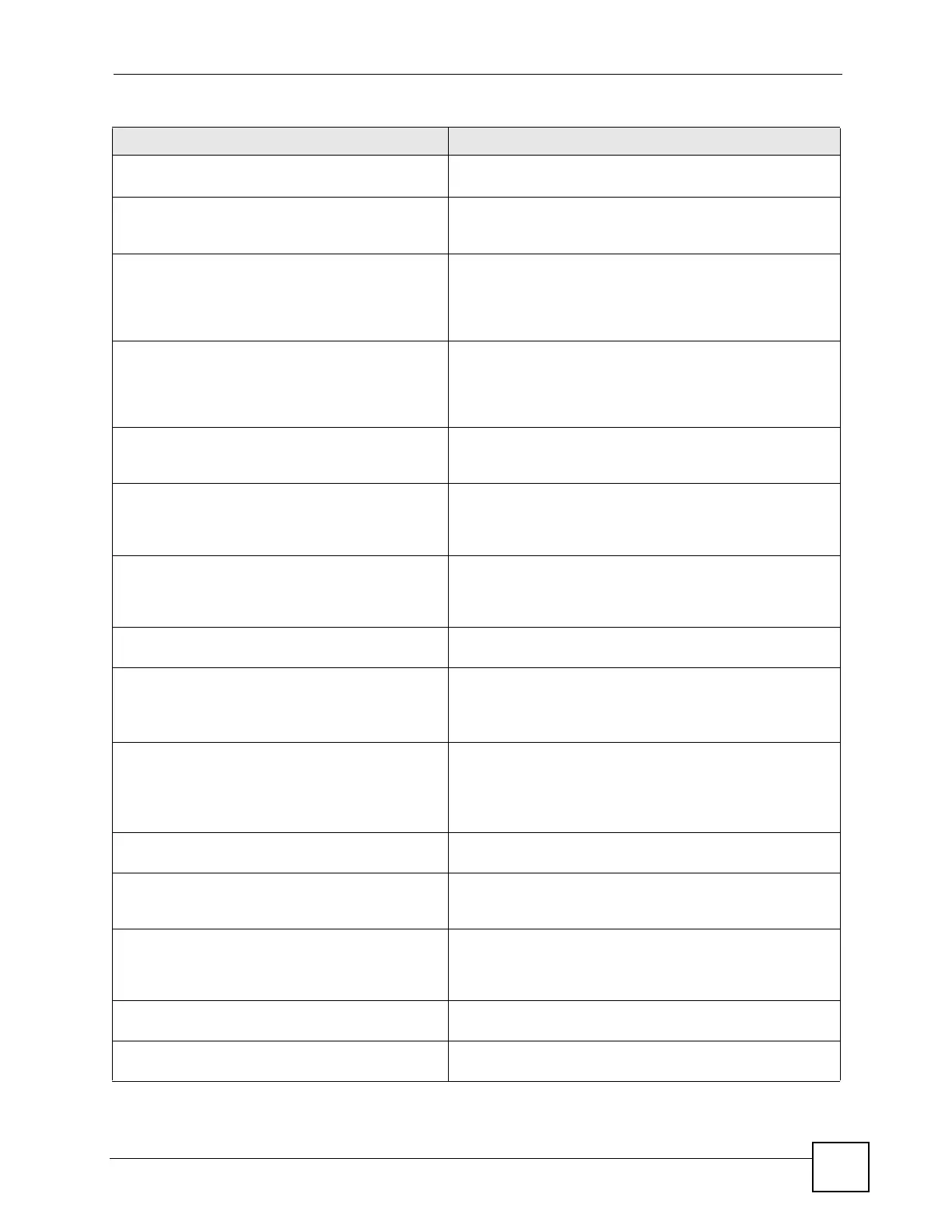
security external auth ip port
<1..65535>
Sets the IP address and port number of an external
authentication (RADIUS) server.
group-key <30..30000> Sets the WPA2 group key update timer. This is the interval in
seconds for how often the AP sends a new group key out to
all clients.
idle <30..30000> Sets the WPA2 idle timeout. The ZyWALL automatically
disconnects a wireless station that has been inactive for this
number of seconds. The wireless station needs to enter the
username and password again before access to the wired
network is allowed.
reauth <30..30000> Sets the WPA2 reauthentication timer. This is at what interval
wireless stations have to resend usernames and passwords
in order to stay connected. If a RADIUS server authenticates
wireless stations, the reauthentication timer on the RADIUS
server has priority.
[no] ip address ip subnet_mask Assigns the specified IP address and subnet mask to the
specified interface. The
no command clears the IP address
and the subnet mask.
[no] mtu <576..1500> Specifies the Maximum Transmission Unit, which is the
maximum number of bytes in each packet moving through
this interface. The ZyWALL divides larger packets into smaller
fragments. The no command resets the MTU to 1500.
[no]ip gateway ip [metric <0..15>] Adds the specified gateway for the interface. Sets the priority
(relative to every gateway on every interface) for the specified
gateway. The lower the number, the higher the priority. The
no command removes the gateway.
[no] upstream <0..1048576> Specifies the upstream bandwidth for the specified interface.
The
no command sets the upstream bandwidth to 1048576.
[no] downstream <0..1048576> This is reserved for future use.
Specifies the downstream bandwidth for the specified
interface. The no command sets the downstream bandwidth
to 1048576.
[no] description description Specifies the description for the specified interface. The
no
command clears the description.
description: You can use alphanumeric and
()+/
:=?!*#@$_%-
characters, and it can be up to 60
characters long.
[no] shutdown Deactivates the specified interface. The
no command
activates it.
[no] ip dhcp-pool profile_name Binds the specified interface to the specified DHCP pool. You
have to remove any DHCP relays first. The no command
removes the binding.
[no] ip helper-address ip Creates the specified DHCP relay. You have to remove the
DHCP pool first, if the DHCP pool is bound to the specified
interface. The
no command removes the specified DHCP
relay.
[no] ip ospf See Section 5.2.5.3 on page 57 for the interface OSPF
commands.
[no] ip rip See Section 5.2.5.2 on page 57 for the interface RIP
commands.
Table 33 WLAN Interface Commands (continued)
COMMAND DESCRIPTION






 To Next Page