ADPRO iFT Series Hardware Installation Manual
27817_08 17
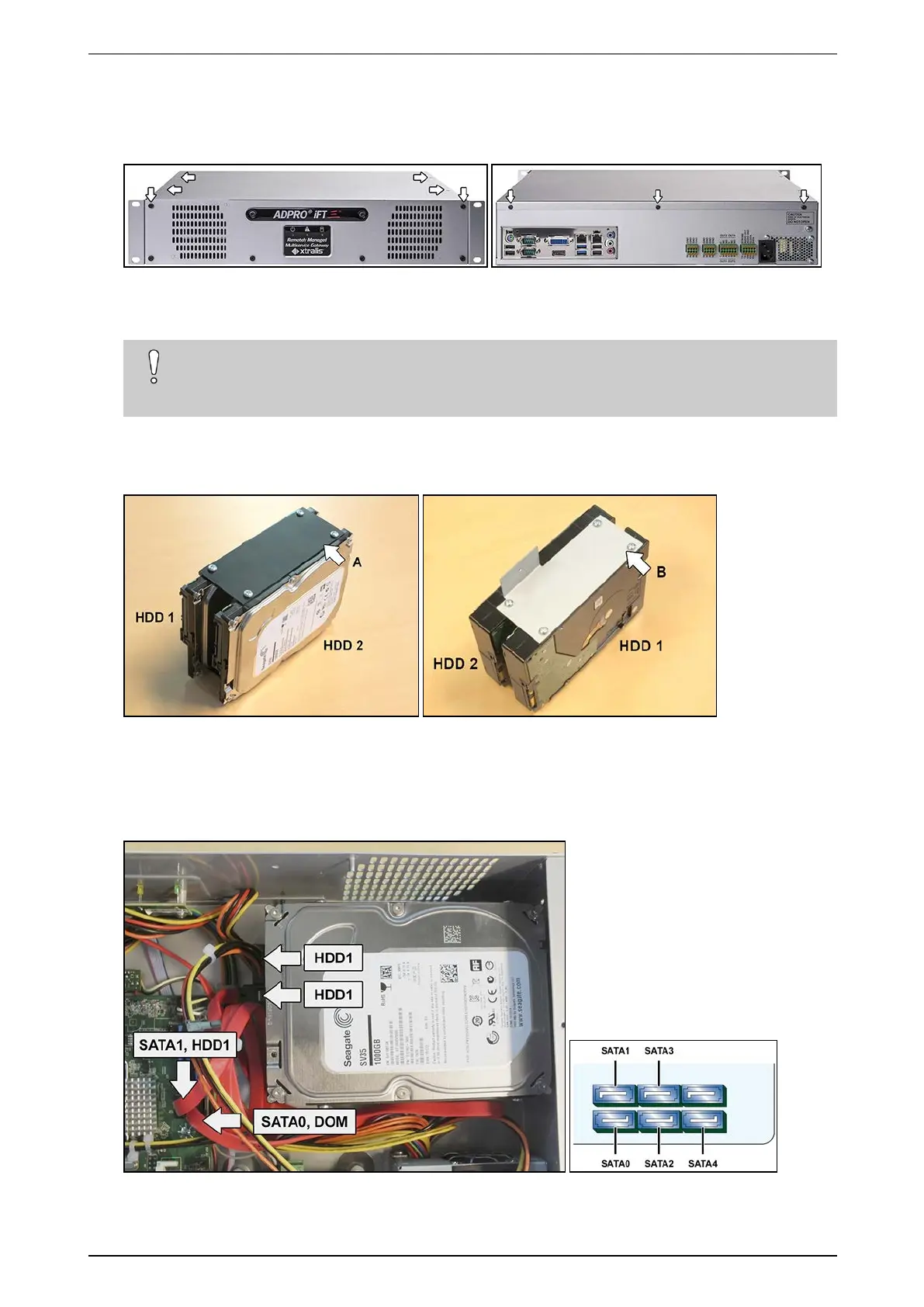
Toinstallasecondharddisk,proceedasfollows:
1. Stopthedevice,switchoffthepowersupply,andthenremovethetopcover:unscrew2screwsatthefront,
4atthetop,and3attheback.
2. Ifthefirstdiskisalreadyinstalled,youhavetoremoveitfirst:unplugitspoweranddatacables,and
unscrewitfromthebottomofthecasing.
Caution!
Ifyoutiltthecasing,restitcarefullyonthesides,butnotontheback.Youmaydamagethe
connectorsifyoudo.
3. Fixthefirstandsecondharddisktogetherusingthe2harddiskbrackets(#17011890and#17011895)and
8screws(#17434080)asshownbelow.Makesurethatthemountingscrewholesonharddisk1areonthe
outside.
A:bracket#17011890;B:L-shapedbracket#17011895
4. Fixharddisk1tothebottomofthecasing.Forinstructionsdependingonthemodelandharddiskcapacity,
seeInstalling the First Hard Disk,step2onpage14.
5. Connectharddisk1tothepowersupply,andtotheSATA1connectoronthemotherboardwiththeSATA
cable(#16520877).



 To Next Page