16 Setting Up the Printer
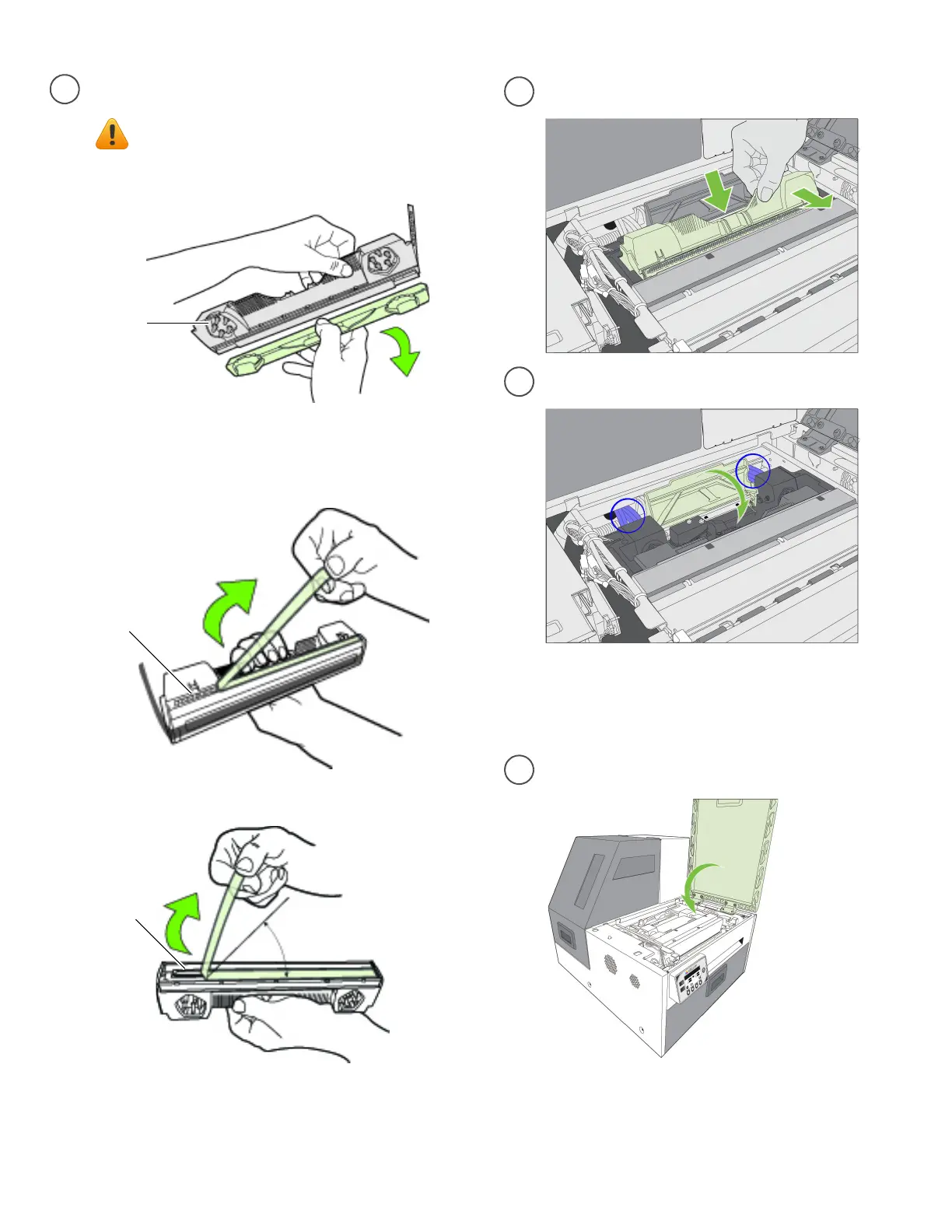
Donottouchtheinkcouplings,
electricalcontacts,ornozzles.
inkcouplings
electricalcontacts
nozzles
Nolessthan45°
Removeprintheadfrompackaging.
e
f
g
Checkthatinkisflowingthroughthetubes
onbothsidesoftheprinthead(circledabove).
Insertprinthead
Closeprintheadlatch
h
Closeprintercover
Slowlyremovetapefromnozzles
Slowlyremovetapefromelectricalcontacts
Removecoverfrominkcouplings
Donotdiscardthecover!
Itshouldbereplacediftheprintheadis
removedfromtheprinter.
Initializationmaytak eseveralminutes.
ThecontrolpanelwilldisplayPrinterOnline
wheninitializationiscomplete.
NOTE:Ifinkisnotflowing,removeprinthead
andwetnozzleswithdeionized/distilledwater.



 To Next Page