L801LabelPrinter
Printer Maintenance 61
ReplacingtheServiceStation
Removal
1. ManuallyOpentheclamshelltoitshighest position.
2. Onthecontrolpanel,select (
Config
) >
Service Station
>
Eject
. Waitfortheprinterto
ejecttheservicestation.
3. Moveservicestationtowardsfrontofprinter.
4. PressthePowerbuttononthecontrolpaneltoturnofftheprinter.SeeTurningOff
thePrinteronpage35.
5. TurnoffthePowerswitchatthebackoftheprinterandunplugthepowercord
.
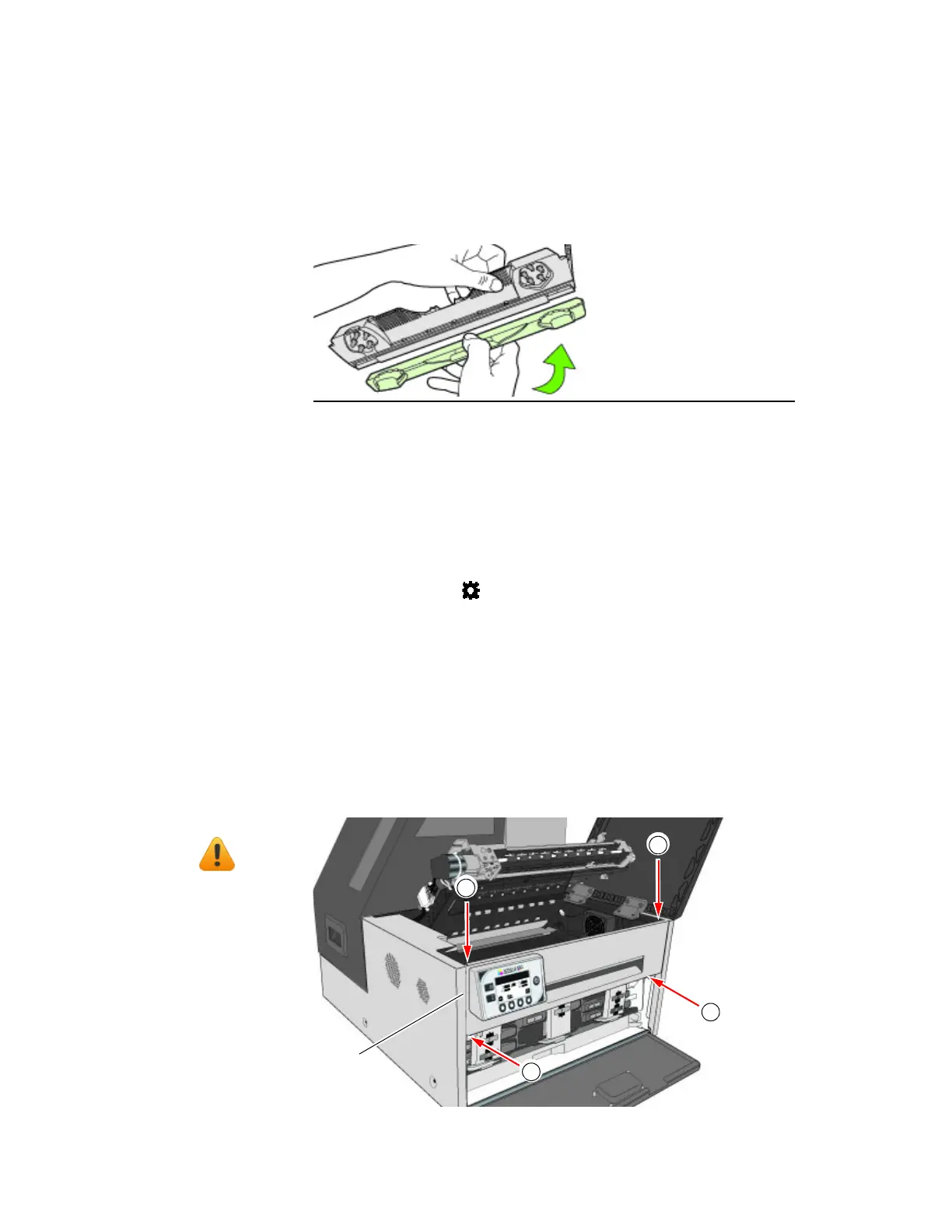
6. Removethefrontpanel:
aUseaT20Torxdrivertoremovethefourscrews(labeled1to4)securingthe
frontpanel.
bReleasethefrontpanelanddisconnectthetwocablesbehindthecontrolpanel.
NOTE: Beforeyo
ubegin,removetheprintheadandcapitwiththeorange
protectivecover,butdonotclosethelatchafterremovingthe
printhead.SeeReplacingthePrin
theadonpage53.
Tools •N
itrilepowder‐freegloves
•T20Torxdriver
• Disposabletowels
2
3
cablesbehind
controlpanel
1
4



 To Next Page