Setting Up the Printer 19
NETWORK
2. MANUAL
Toconnectprintertonetwork
h
i
j
a
Printer
Network
Network
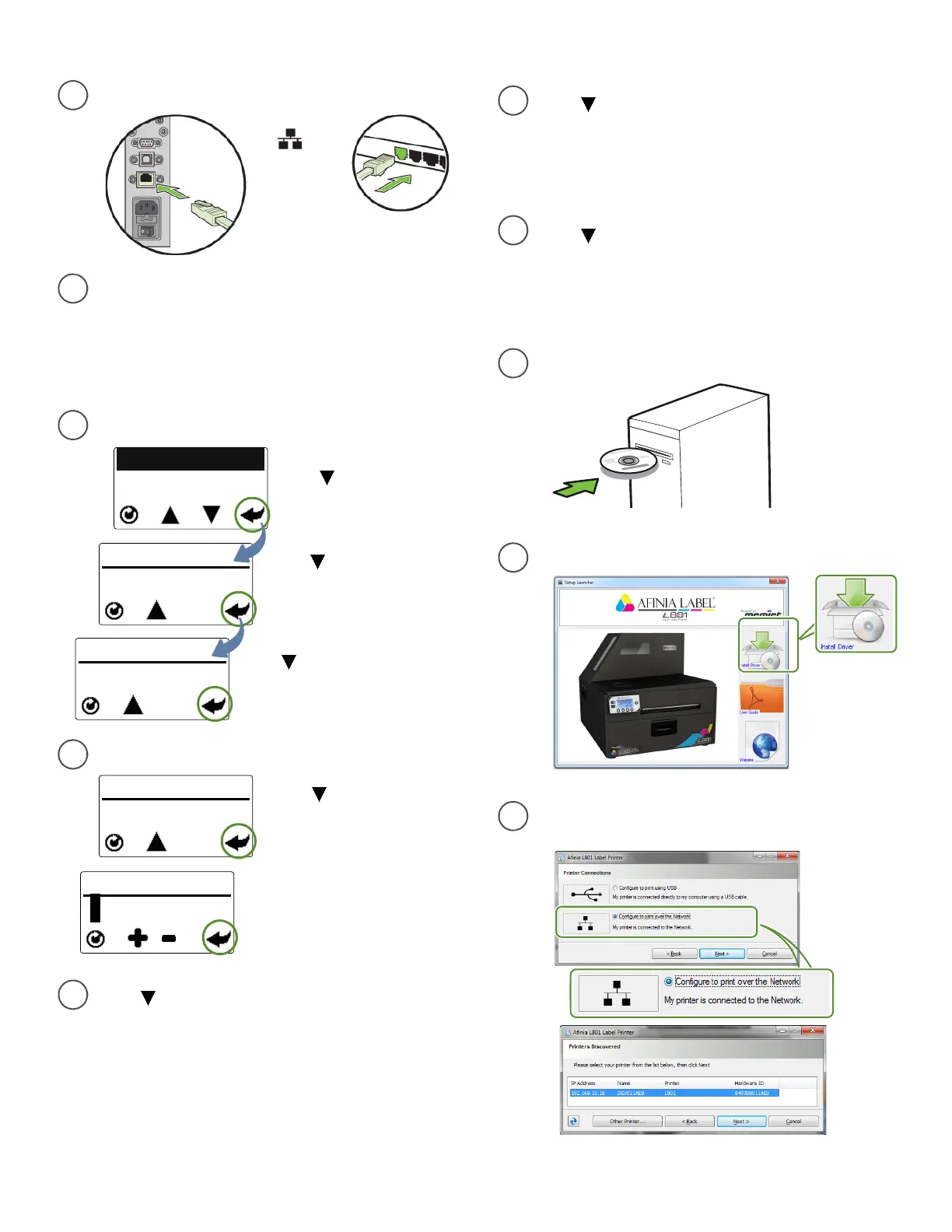
ConnectprintertonetworkusingEthernet
b
c
SetDHCPSettingstoManual
NETWORK
2. DHCP SETTINGS
Pressuntildisplayread s
Network,thenpressSelect
Pressuntildisplayreads
DHCPSettings,thenpress
Select.
CONFIGURATION
8. NETWORK
PressuntildisplayreadsManual,
thenpressSelect.PressReturntogo
backtotheNetworkmenu
d
SettheStaticIPAddress
STATIC IP
0 0 0.
0 0 0.0 0 0.0 0 0
EnterthefirstStaticIPdigitusing
the
+or
‐
button,thenpress
Select.Repeatfornexteleven
digits.PressReturnoncewhen
complete
NETWORK
3. IP SETTINGS
PressuntildisplayreadsIP
Settings,thenpressSelectthree
times
e
Press untildisplayreadsSubnetMask,
thenpressSelecttwotimes.
EntertheSubnetMaskusingthesame
stepsaswhensettingtheStaticIPaddress
f
Press untildisplayreadsDefault
Gateway,thenpressSelecttwotimes.
EntertheDefault Gatewa yusingthesame
stepsaswhensettingtheStaticIPaddress
g
Press untildisplayreadsWinsServer,
thenpressSelecttwotimes.
EntertheWinsServerusingthesamesteps
aswhensettingtheStaticIPaddress
SelectInstallDriverfromtheInstallationwindow
InsertInstallationdiscintocomputer
SelectConfiguretoprintovertheNetwork
andclickNext
IfyouwillbeusingDHCPtosettheIP
Address, skiptosteph.
ToassigntheprinteraStaticIPaddress,the
SecurityLevelmustbesetto2.Pleasesee
SelectingtheSecurityLevelonpage12.



 To Next Page