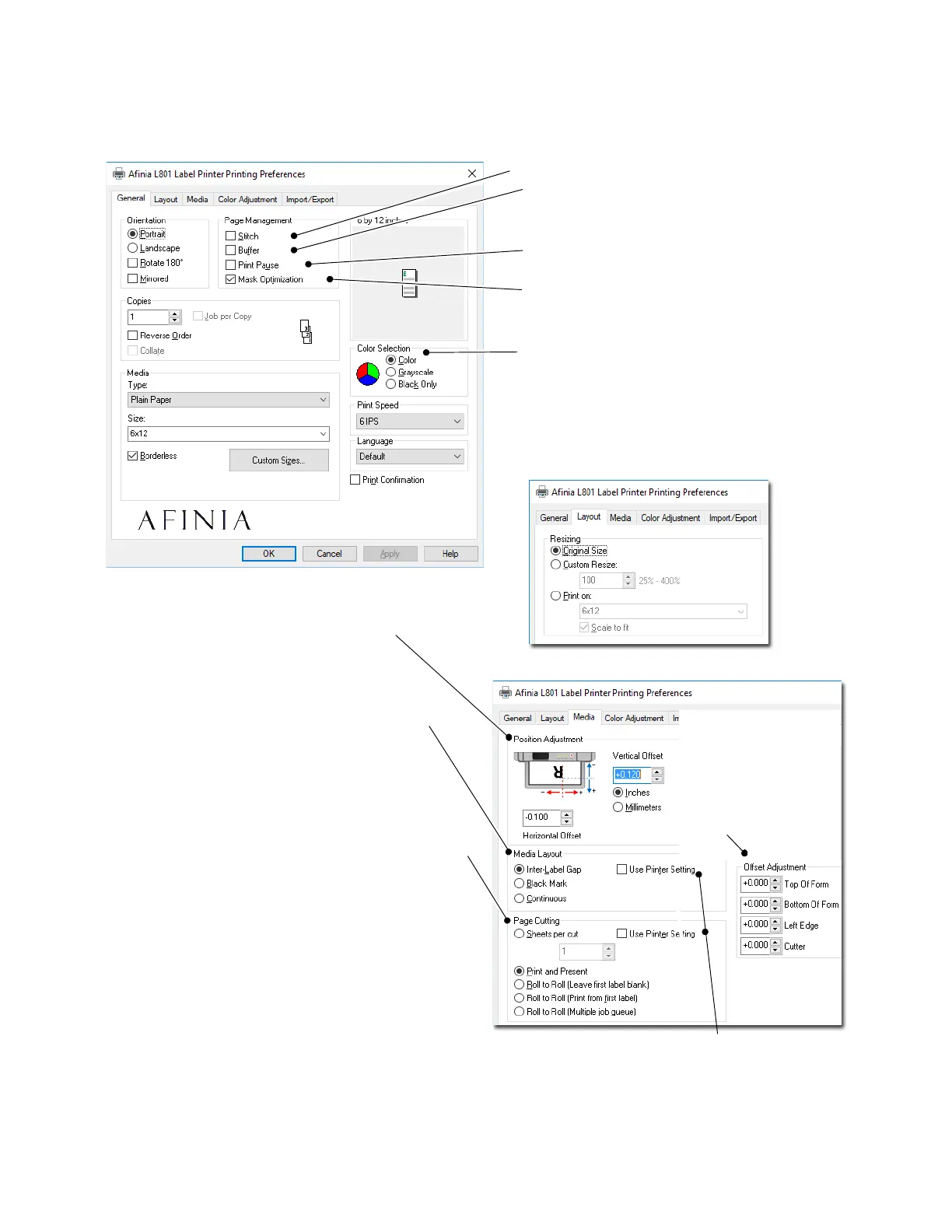
PageCutting
SheetsPerCut–Cutafterprintingthespecifiednumber
oflabels.
PrintandPresent–Print,cut,andpresentlabel.Remove
thelabeltocontinueprinting.
RolltoRoll–SelectfromtheseRolltoRolloptionsifa
rewinderisused(inordershown):
•Firstlabelwi llbeblank
•Printingstartswith thefirstlabel
• Multiplejobqueue:Firstlabelwillbeblank.Cutwill
notoccuruntilthenextjobspecifiesacutoranidle
periodbetweenjobsof10secondshaspassed,
whichevercomesfirst
Printpageswithoutanygap(continuousmediaonly).
Renderentiredocumenttodiskbefore
sendingtotheprinter.Selectthisoptionif
labelsareskippedwhenprintinglargefiles.
PositionAdjustment
Adjusthorizontalandverticalprintposition.
SeeAdjustingAlignmentforPrintingon
page30.
MediaLayout
Selectwhetherthecurrentlabelstockincludesa
gapbetweenthelabels,hasa
blackmarkbetween
thelabels,oriscontinuousstock.
Usedtospecifythelabelsizesensingmechanism.
ColorSelection
SelectColortoprintthesamecolorsdisplayedin
application
SelectGreyscaletoprintinblackandshadesof
grey(compositecolor)
SelectBlackOnlytouseonlyblackink
SelectPrintPauseiflabelsareskippedwhen
printingtosmalllabels.
SelectMaskOptimizationtoremoveprint
artifactswhenusingmulti‐layerimagefiles.
Whenchecked,theMediaLayout
andPageCuttingsett ings onthe
printercontrolpanelwillbeused.
OffsetAdjustment
SettheTopofForm,
BottomofForm,Left
Edge,andCutteroffsets.
SeeAdjustingAlignment
forPrintingonpage30.



 To Next Page