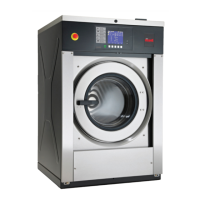
Machine Operation
Start Up
When power is applied to the machine, the control becomes ac-
tive and will display its software version as SXX (XX is the ver-
sion number) for one (1) second. If the control was not powered
down during a running cycle, it will enter the Start Mode.
Door Locking Mode
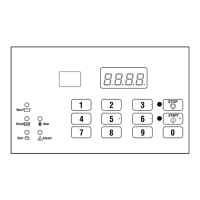
The control enters this mode after the START (enter) keypad is
pressed in Start Mode. The control stays in Door Locking Mode
until it confirms the door is closed and locked.
Stop Mode
The control enters this mode if the user stops the cycle by press-
ing the STOP UNLOCK keypad (125 lb. models) or STOP key-
pad (all other models). If control does not detect water or cylinder
rotation, it will enter Door Unlocking Mode.
Start Mode
The control enters this mode when machine is ready for opera-
tion. The display will show CYxx where xx is the cycle num-
ber.
After pressing the START (enter) keypad, the door will lock and
the cycle will begin.
End of Cycle Mode
When a cycle is complete, the control will display 00 until the
machine door is opened. When this event occurs the display will
revert back to Start Mode.
Cycle Sequence
Upon the start of a cycle, the control will display the total cycle
time. The appropriate LEDs will light while the machine passes
through different cycle steps. Any coin entered after the first fill
step will be added to the total coin counter, but the user will not
be able to change cycles.
Upon the start of a cycle, the control will display the total cycle
time. The appropriate LEDs will light while the machine passes
through different cycle steps. The user will not be able to change
cycles or water temperature.
Run Mode
The control enters this mode when a cycle is running. The time
remaining appears in the display, the status LEDs are lit and the
loading door is locked.
Signals
The options for when a signal can be used during the machine op-
eration are listed below:
1. End of Cycle Signal - By default, this signal is turned off. If
turned on, the signal sounds for three (3) seconds at the end of
a cycle.
2. Signal On Keypad Depression - By default, this signal is
turned on and sounds for a quarter of a second each time a
keypad is pressed.
NOTE: Refer to Programming the Control to program sig-
nal options.
Changing Cycles
Cycles cannot be changed anytime after the machine is started.
Door Unlocking Mode
The control enters this mode after cycle has ended. The control
waits for confirmation that door is unlocked. Once confirmation
is received that door is unlocked, control will enter End of Cycle
Mode.
Machine Operation
©
Copyright, Alliance Laundry Systems LLC -
DO NOT COPY or TRANSMIT
12 Part No. F8238101ENR11


 To Next Page