Auto-Water Leak Detection ALd-
This option allows the owner to set the time and frequency that
the control automatically checks the water level. The owner pro-
grams which day(s) of the week and hour of day(s) they want this
test to occur. The owner may also program this test to only occur
after XX number of machine cycles have been completed since
the last time the test was run. In order for this Auto-Water Leak
Detection test to occur, the machine’s door must be closed.
1. Control must be in Manual Mode. Refer to Entering the Man-
ual Mode.
2.
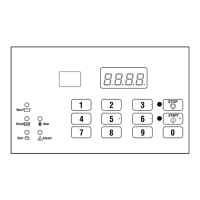
Press the #3 (∧) or the #6 (∨) keypad until Prog appears in
the display. Press the START (enter) keypad and dCYC will
appear in the display.
3. Press the #3 (∧) or the #6 (∨) keypad to scroll through the pro-
grammable options until ALd- appears in the display. Press
the START (enter) keypad and ALd1 will appear in the dis-
play.
4. Press the #3 (∧) or the #6 (∨) keypad to scroll through the pro-
grammable options. Refer to Table 11 .
Programmable Options
ALd1 Auto-Water Leak Detection (oFF* or
0-127 cycles [on] – Number of complet-
ed cycles after which this test will occur.)
ALd2 Auto-Water Leak Detection Hour (0*-23
– Hour of the day this test will occur.)
ALd3
Auto-Water Leak Detection Day of Week
(0-127* – Refer to Table 4 .)
*Factory default setting
Table 11
5. When the desired option appears in the display, press the
START (enter) keypad. The current value will appear in the
display.
6. Press the #3 (∧) or the #6 (∨) keypad to enable during cycles,
disable, increase or decrease the hours or day.
NOTE: The hours will be displayed in military time.
For day of week, Sunday is considered day one
(001), Monday is day two (002) and so on. Refer to
Table 4 .
7. Press the START (enter) keypad when the correct value ap-
pears in the display. The next option, dCyC , will appear in
the display.
NOTE: To program dCyC (Default Cycle), refer to De-
fault Cycle dCYC. To program other options, refer to
the appropriate section.
Programming Control
©
Copyright, Alliance Laundry Systems LLC -
DO NOT COPY or TRANSMIT
52 Part No. F8238101ENR11


 To Next Page