Collecting Audit Information
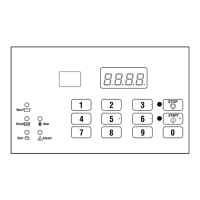
This feature allows the owner to retrieve audit information stored
in the machine by pressing a sequence of pads on the control. For
an explanation of the audit options available, refer to Table 12 .
How to Enter Audit Feature
1. Control must be in Manual Mode. Refer to Entering the Man-
ual Mode.
2.
Press the #3 (∧) or the #6 (∨) keypad until AUdt appears.
3.
Press the START (enter) keypad. CyC will appear.
How to Read Audit Data
1. Use the #3 (∧) or the #6 (∨) keypad to scroll through various
options until the desired option is shown in the display. Refer
to the Audit Options List, Table 12 , for an explanation of the
audit options available.
Audit Options List
# Display Description
1
CyC
Total # of machine cycles
2
rCyC
Total # of rapid advanced cy-
cles
Table 12
2. Once the desired option appears in the display, press the
START (enter) keypad once (1) to start the audit count. At
this point, the display will show the first four (4) digit seg-
ment of the audit value. If the audit count is 10,000 or higher,
press the START (enter) keypad again to view the last four (4)
digits of the number.
NOTE: The display can show up to 4 digits at one
time. Audit counts 10,000 or higher are separated in-
to two 4-digit segments. Each time the START (en-
ter) keypad is pressed in step 2, the display will
show the next four (4) digit segment in the audit val-
ue. If the value is 9,999 or less, only one 4-digit seg-
ment will be shown.
For Example: In the Total Number of Coins #1 option with
Coi1 shown in the display, the audit has counted 10,009 coins.
Pressing the START (enter) keypad one time will show _ _ _
1 to represent ten thousand. Pressing the START (enter) keypad a
second time will display 0009 meaning nine. The total equals
00010009 or 10,009.
3. Press the START (enter) keypad again. The control will go to
the next audit option in the Audit Options List.
4. To select other audit options, repeat steps 1–4.
How to Exit Audit Feature
Press the #5 (<) keypad.
Collecting Audit Information
©
Copyright, Alliance Laundry Systems LLC -
DO NOT COPY or TRANSMIT
53 Part No. F8238101ENR11


 To Next Page