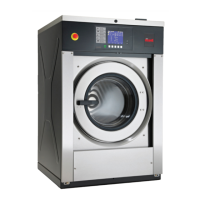
Testing Machine and Electronic Control
Functions
This feature allows the owner to run diagnostic tests on various
machine operations without servicing the machine. The following
tests are available:
• Front End Control Software Version Number
• Output Board Control Software Version Number
• Output Board Water Level Sensor Trim Value
• Top Cover Opening Test
• Door Switch Input Test
• Door Lock Input Test
• Show Fill Time Test
• Show Drain Time Test
• Temperature Sensor Display Test
• VFD Balance Input Test (Design 1 models only)
• 24 VAC Switch Input Test (Design 1 models only)
• VFD Drive Fault Input Test (Design 1 models only)
• Frame Stability Switch Input Test
• VFD Balance Weight Test (Design 1 models only)
• Water Purge Test
• Water Leak Detection Test
The following tests are available on Design 2 and 3 models only:
• Drive Software Version Number
• Drive Parameter Table Version Number
• Drive Type Value
• Drive DC Bus Display Test
How to Enter Diagnostic Testing
Feature
1. Control must be in Manual Mode. Refer to Entering the Man-
ual Mode.
2.
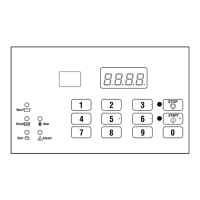
Press the #3 (∧) or the #6 (∨) keypad until dIAg appears.
3. Press the START (enter) keypad. Display will change to
d001 indicating the Front End Control Software Version
Number test.
4. Press the #3 (∧) or the #6 (∨) keypad to scroll through the di-
agnostic test options.
How to Start Tests
To start a diagnostic test, refer to the quick reference chart (Table
13 ). Press the START (enter) keypad when the desired test num-
ber is displayed. For detailed information on each test, read the
appropriate description.
How to Exit Diagnostic Testing Feature
Press the #5 (<) keypad. The display will return to the previous
mode of operation.
Diagnostic (Testing) Mode – Quick Reference Chart
Test Number Diagnostic Mode Display
d001
Front End Control Software Version # Test
S xx
d002
Output Board Control Software # Test
o xx
d003
Output Board Water Level Sensor Trim Value
txxx
d004
Top Cover Opening Test
A oP or A CL
d009
Door Switch Input Test
drCL or drOP
d010
Door Lock Input Test
drUL or drLO
d011
Show Fill Time Test
Fxxx
d012
Show Drain Time Test
dxxx
d013
Temperature Sensor Display Test
xxxF or xxxC
d014
Start Pulse Test
Stxx
Table 13 continues...
Testing Machine and Electronic Control Functions
©
Copyright, Alliance Laundry Systems LLC -
DO NOT COPY or TRANSMIT
55 Part No. F8238101ENR11


 To Next Page