No Cycle Time Display nCtd
This option allows the owner to enable or disable whether the cy-
cle time will appear in the display.
1. Control must be in Manual Mode. Refer to Entering the Man-
ual Mode.
2.
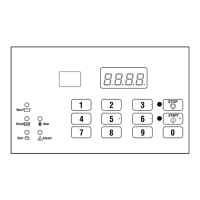
Press the #3 (∧) or the #6 (∨) keypad until Prog appears in
the display. Press the START (enter) keypad and dCYC will
appear in the display.
3. Press the #3 (∧) or the #6 (∨) keypad to scroll through the pro-
grammable options until nCtd appears in the display.
4.
When nCtd appears in the display, press the START (enter)
keypad. The current No Cycle Time Display status will ap-
pear in the display.
on = Option Enabled
oFF = Option Disabled (default setting)
5. Press the #3 (∧) or the #6 (∨) keypad to change the current
status.
6. Press the START (enter) keypad when the desired status ap-
pears in the display. The next option, PCtd, will appear in the
display.
NOTE: To program PCtd (Programmable Cycle Time
Display), refer to Programmable Cycle Time Display
PCtd. To program other options, refer to the appro-
priate section.
Programmable Cycle Time Display PCtd
This option allows the owner to program the displayed cycle
time.
1. Control must be in Manual Mode. Refer to Entering the Man-
ual Mode.
2.
Press the #3 (∧) or the #6 (∨) keypad until Prog appears in
the display. Press the START (enter) keypad and dCYC will
appear in the display.
3. Press the #3 (∧) or the #6 (∨) keypad to scroll through the pro-
grammable options until PCtd appears in the display.
4.
When PCtd appears in the display, press the START (enter)
keypad. The current Programmable Cycle Time Display status
will appear in the display.
on = Option Enabled
oFF = Option Disabled (default setting)
NOTE: Enabling this option will not change the cy-
cle time, only the display time for the user. Refer to
option Cnin in Cycle Programming to program mi-
nutes to the cycle time display.
5. Press the #3 (∧) or the #6 (∨) keypad to change the current
status.
6. Press the START (enter) keypad when the desired status ap-
pears in the display. The next option, SdAd, will appear in the
display.
NOTE: To program SdAd (Slow Drain Detection Ad-
just Value), refer to Slow Drain Detection Adjust Value
SdAd. To program other options, refer to the appro-
priate section.
Programming Control
©
Copyright, Alliance Laundry Systems LLC -
DO NOT COPY or TRANSMIT
46 Part No. F8238101ENR11


 To Next Page