Special Features
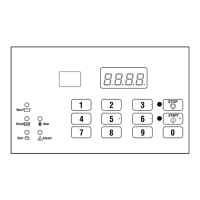
Programming the Control
The control allows the machine owner to program the control
with the use of the keypad. Cycle options may be programmed,
audit information may be viewed and diagnostic tests may be run
by pressing combinations of the keypads.
For details on programming select cycle options, refer to Pro-
gramming Control.
Collecting Audit Information
The control will store audit information in its memory that can be
retrieved by pressing various combinations of keypads. The con-
trol will record total machine cycles and total rapid advance cy-
cles.
For more information on the audit features, refer to Collecting
Audit Information.
NOTE: Additional audit information is retrievable with
an external device, using infra-red communications.
Refer to the appropriate instruction manual.
Testing Machine and Control Functions
Special diagnostic features built into the control allow the owner
to run specific diagnostic tests. By opening and closing the top
cover and then pressing various sequences of Select Cycle key-
pads, the owner may retrieve or perform the following tests:
• Front End Control Software Version Number
• Output Board Control Software Version Number
• Output Board Water Level Sensor Trim Value
• Top Cover Opening Test
• Door Switch Input Test
• Door Lock Input Test
• Show Fill Time Test
• Show Drain Time Test
• Temperature Sensor Display Test
• Start Pulse Test
• VFD Balance Input Test
• 24 VAC Switch Input Test
• VFD Drive Fault Input Test
• Frame Stability Switch Input Test
• VFD Balance Weight Test (Design 1 models only)
• Drive DC Bus Display Test (Design 2 and 3 models only)
• Water Purge Test
• Water Leak Detection Test
• Drive Software Version Number (Design 2 and 3 models on-
ly)
• Drive Parameter Table Version Number (Design 2 and 3 mod-
els only)
• Drive Type (Design 2 and 3 models only)
For detailed information on running diagnostic tests, refer to Test-
ing Machine and Electronic Control Functions.
Rapid Advance Feature
This feature allows the user to quickly advance through active cy-
cles. This feature is useful when tests must be performed immedi-
ately on a machine currently in an active cycle. In this case, the
user can quickly advance through the cycles to Ready Mode the
shake out step, then End of Cycle Mode Shakeout. At this point,
the user can perform the required tests and then return the ma-
chine to the point it was interrupted.
Communications Mode
This feature allows the control to communicate with an external
device. This allows the control to be programmed and have its
data read without using the keypad.
For more detailed information on using the Communications
Mode feature, refer to Communications.
Top Cover Openings
The control will capture the times and dates of the openings of
the Top Cover. The information is saved in memory. An open top
cover combined with various keypad presses allows the control to
enter manual modes of operation. These modes include Manual
Programming, Audit Collection and Diagnostics.
Power Save Mode
This feature powers down the display after machine is idle for 4
minutes and 15 seconds.
To “wake up” the machine display, press any Cycle keypad.
The Power Save Mode is a feature of the control and cannot be
disabled in programming.
Temperature Display Mode
This feature allows machines equipped with a temperature sensor
to display the current water temperature after the first fill during a
cycle. Press the 0 (zero) keypad to display temperature and press
again to return to remaining cycle time.
Special Features
©
Copyright, Alliance Laundry Systems LLC -
DO NOT COPY or TRANSMIT
13 Part No. F8238101ENR11


 To Next Page