Cycle Programming Cy--
This option allows the owner to program different aspects for var-
ious steps in each type of cycle. There are thirty (30) cycles avail-
able for programming.
1. Control must be in Manual Mode. Refer to Entering the Man-
ual Mode.
2.
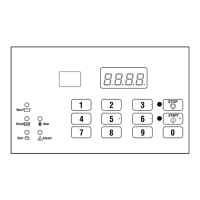
Press the #3 (∧) or the #6 (∨) keypad until Prog appears in
the display. Press the START (enter) keypad and dCYC will
appear in the display.
3. Press the #3 (∧) or the #6 (∨) keypad to scroll through the pro-
grammable options until Cy-- appears in the display. Press
the START (enter) keypad and Cy01 will appear in the dis-
play.
4. Press the #3 (∧) or the #6 (∨) keypad to scroll through the cy-
cles to program. Press the START (enter) keypad when the
desired cycle appears in the display.
5.
The first Cycle Programming option, AgIt, will appear in the
display.
NOTE: To program AgIt (Cycle Agitate), continue to
next option. To program other options, press the #3
(∧) or the #6 (∨) keypads and refer to the appropriate
section.
How to Program Cycle Agitate AgIt
This option allows the owner to program the cycle’s agitation ac-
tion and speed. These options apply to the entire cycle.
1. Press the #3 (∧) or the #6 (∨) keypad to scroll through the pro-
grammable Cycle Programming options until AgIt appears
in the display.
2.
When AgIt appears in the display, press the START (enter)
keypad. The first Cycle Agitate option will appear in the dis-
play.
3. Press the #3 (∧) or the #6 (∨) keypad to scroll through the pro-
grammable options. Refer to Table 5 .
4. Press the START (enter) keypad when the desired program-
mable option appears in the display. The current status will
appear in the display. Refer to Table 5 .
Final
Spin
Step Description Status
tyPE
Agitate Type 1 = 18/3/18 Agita-
tion Action
2 = 10/20/10 Agita-
tion Action
3 = 3/27/3 Agitation
Action
4 = 4/56/4 Agitation
Action
ASPd
Agitate Speed
(VFD only)
Lo = Reduced
Speed
rEg = Normal
Speed
Table 5
5. Press the #3 (∧) or the #6 (∨) keypad to change the current
status.
6. Press the START (enter) keypad when the desired status ap-
pears in the display. The next Cycle Agitate option will ap-
pear in the display.
NOTE: To program SEg1 (Cycle Segment 1) press
the #5 (<) keypad and continue to next Cycle Pro-
gramming option. To program other options, press
the #5 (<) keypad and refer to the appropriate sec-
tion.
How to Program Cycle Segment SEg-
There are eight (8) programmable cycle segments. Within each
segment, there are several programmable options.
1. Press the #3 (∧) or the #6 (∨) keypad to scroll through the
eight (8) programmable Cycle Segments until the desired seg-
ment appears in the display.
2. When the desired segment appears in the display, press the
START (enter) keypad. SgEn (Segment Enable/Disable) will
appear in the display.
3. Press the #3 (∧) or the #6 (∨) keypad to scroll through the Cy-
cle Segment programmable options.
NOTE: If the Segment Enable/Disable is program-
med oFF, the other Cycle Segment programming op-
tions can’t be accessed.
4. Press the START (enter) keypad when the desired Cycle Seg-
ment programmable option appears in the display.
Programming Control
©
Copyright, Alliance Laundry Systems LLC -
DO NOT COPY or TRANSMIT
36 Part No. F8238101ENR11


 To Next Page