Programming Segment Enable/Disable
1.
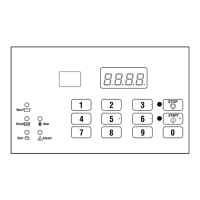
When SgEn appears in the display, press the START (enter)
keypad. The current Segment Enable/Disable status will ap-
pear in the display.
on = Option Enabled
oFF = Option Disabled
2. Press the #3 (∧) or the #6 (∨) keypad to change the current
status.
NOTE: If the Segment Enable/Disable is program-
med oFF, the other Cycle Segment programming op-
tions can’t be accessed.
3. Press the START (enter) keypad when the desired status ap-
pears in the display. The next Cycle Segment option, FILL,
will appear in the display.
NOTE: To program FILL (Fill Step), continue to next
Cycle Segment option. To program other options,
press the #3 (∧) or the #6 (∨) keypads and refer to
the appropriate section.
Programming Fill Step
1.
When FILL appears in the display, press the START (enter)
keypad. The first Fill step programming option will appear in
the display.
2. Press the #3 (∧) or the #6 (∨) keypad to scroll through the pro-
grammable Fill step options. Refer to Table 6 .
NOTE: Fill Step FLEn must be enabled to scroll
through all Fill Step options.
3. Press the START (enter) keypad when the desired option ap-
pears in the display. The current status will appear in the dis-
play. Refer to Table 6 .
Fill
Step Description Status
FLEn
Fill Step Enable/ Dis-
able
on/oFF
FLEU
Fill Level
HI = High
nEd = Medium
Lo = Low
1-30
tEnP
Fill Temperature
CoLd = Cold
UArn = Warm
Hot = Hot
(35°F-194°F
[2°C-90°C])
Table 6
4. Press the #3 (∧) or the #6 (∨) keypad to change the current
status.
5. Press the START (enter) keypad when the desired status ap-
pears in the display. The next Fill step option will appear in
the display.
NOTE: To program SUPL (Supply Step), continue to
next Cycle Segment option. To program other op-
tions, press the #3 (∧) or the #6 (∨) keypads and re-
fer to the appropriate section.
Programming Supply Step
1.
When SUPL appears in the display, press the START (enter)
keypad. The first Supply step programming option will appear
in the display.
2. Press the #3 (∧) or the #6 (∨) keypad to scroll through the pro-
grammable Supply step options. Refer to Table 7 .
NOTE: Supply Step SUEn must be enabled to scroll
through all Supply Step options.
3. Press the START (enter) keypad when the desired option ap-
pears in the display. The current status value will appear in the
display. Refer to Table 7 .
NOTE: For the Dispenser options, the display will
show Cx or Sx depending whether or not the control
is programmed as compartment-oriented or supply-
oriented. Refer to Supply Compartment Dispenser Pro-
gramming SUPC (Design 1 Models Only).
Programming Control
©
Copyright, Alliance Laundry Systems LLC -
DO NOT COPY or TRANSMIT
37 Part No. F8238101ENR11


 To Next Page