Supply Step Description
Status/
Value
SUEn
Supply Step En-
able/Disable
on/oFF
diSP
Dispenser options (Design 1
models only)
Press START
(enter) to access
options
C2 or
S1
Compartment 2/
Supply #1
on/oFF
C3 or S2
Compartment 3/
Supply #2
on/oFF
C4 or S3
Compartment 4/
Supply #3
on/oFF
S4
Supply #4
on/oFF
Dispenser options (Design 2
and 3 models only)
Press START
(enter) to access
options
C2
Compartment 2
on/oFF
C3
Compartment 3
on/oFF
C4
Compartment 4
on/oFF
S1
Supply #1
on/oFF
S2
Supply #2
on/oFF
S3
Supply #3
on/oFF
S4
Supply #4
on/oFF
SdUr
Supply Duration Press START
(enter) to access
options
SEC
Seconds 0-59
nIn
Minutes 0-9
Table 7
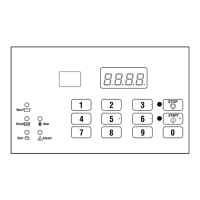
4. Press the #3 (∧) or the #6 (∨) keypad to change the current
status/value.
5. Press the START (enter) keypad when the desired status/value
appears in the display. The next Supply step option will ap-
pear in the display.
NOTE: To program AgSt (Agitate Step), continue to
next Cycle Segment option. If in the Dispenser Op-
tions or Supply Duration programming option, press
the #5 (<) keypad first. To program other options,
press the #3 (∧) or the #6 (∨) keypads and refer to
the appropriate section.
Programming Agitate Step
1.
When AgSt appears in the display, press the START (enter)
keypad. The first Agitate step programming option will ap-
pear in the display.
2. Press the #3 (∧) or the #6 (∨) keypad to scroll through the pro-
grammable Agitate step options. Refer to Table 8 .
NOTE: Agitate Step AgEn must be enabled to scroll
through all Agitate Step options.
3. Press the START (enter) keypad when the desired option ap-
pears in the display. The current status/value will appear in
the display. Refer to Table 8 .
Agitate
Step Description Status/Value
AgEn
Agitate Step Enable/
Disable
on/oFF
AdUr
Agitate Duration (in
minutes)
1-30 minutes for
agitate types 1 or 2
1-180 minutes for
agitate types 3 or 4
(refer to Cycle
Programming
Cy--)
HEAt
Heat in Agitate (if
heater is present)
oFF
1 = To target
2 = Maintain
Table 8
4. Press the #3 (∧) or the #6 (∨) keypad to change the current
status/value.
5. Press the START (enter) keypad when the desired status/value
appears in the display. The next Agitate step option will ap-
pear in the display.
NOTE: To program drAn (Drain Step), continue to
next Cycle Segment option. To program other op-
tions, press the #3 (∧) or the #6 (∨) keypads and re-
fer to the appropriate section.
Programming Drain Step
1.
When drAn appears in the display, press the START (enter)
keypad. The current status will be displayed.
2. Press the #3 (∧) or the #6 (∨) keypad to change the current
status.
on = Option Enabled
oFF = Option Disabled
NOTE: Drain must be enabled to activate Extract
step.
Programming Control
©
Copyright, Alliance Laundry Systems LLC -
DO NOT COPY or TRANSMIT
38 Part No. F8238101ENR11


 To Next Page