Enter Manual Mode.
1. Open top cover
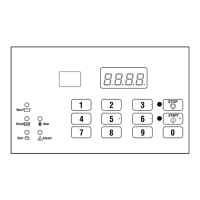
2. Press and hold both #4 keypad and
#1 keypad at the same time.
“rAPd” - Quickly advance through active
cycles.
1. Press START (enter) keypad to begin Rapid
Advance cycle and advance through cycle
steps.
“Prog” - Program cycle information and
other features into the Control.
1. Refer to the Manual Programming
flowchart.
“AUdt” - Retrieve audit information for
machine.
1. Press START (enter) keypad.
“CyC” - Total number of machine cycles:
1. Press START (enter) once to read audit.
“rSEt” - Reset the control’s programming data
to factory default.
1. Press START (enter) keypad.
“dIAg” - Run diagnostic tests on machine
operations.
1. Press START (enter) keypad. Refer to
Diagnostic Tests flowchart.
“rCyC” - Total number of rapid
advanced cycles:
1. Press START (enter) once to read audit.
CHM1352R_SVG


 To Next Page