Diagnostic Test Descriptions
Front End Control Software Version Number Test
This option displays the front end control software version num-
ber. To start test, control must be in the Diagnostic Testing Mode.
Refer to How to Enter Diagnostic Testing Feature at the begin-
ning of this section.
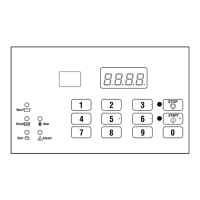
To enter, press the START (enter) keypad. The display will show
S xx where xx is the front end control software version number.
To exit the Front End Control Software Version Number Test,
press the #5 (<) keypad. The control will return to the Diagnostic
Testing Mode.
Output Board Control Software Version Number
This option displays the output board control software version
number. To start test, control must be in the Diagnostic Testing
Mode. Refer to How to Enter Diagnostic Testing Feature at the
beginning of this section.
To enter, press the START (enter) keypad. The display will show
o xx where xx is the output board control software version
number.
To exit the Output Board Control Software Version Number Test,
press the #5 (<) keypad. The control will return to the Diagnostic
Testing Mode.
Output Board Water Level Sensor Trim Value
This option displays the output board water level sensor trim val-
ue. To start test, control must be in the Diagnostic Testing Mode.
Refer to How to Enter Diagnostic Testing Feature at the begin-
ning of this section.
To enter, press the START (enter) keypad. The display will show
txxx where xxx is the trim value sent from the output board to
the front end control.
To exit the Output Board Water Level Sensor Trim Value, press
the #5 (<) keypad. The control will return to the Diagnostic Test-
ing Mode.
Top Cover Opening Test
This option tests the top cover switch. To start test, control must
be in the Diagnostic Testing Mode. Refer to How to Enter Diag-
nostic Testing Feature at the beginning of this section.
To enter, press the START (enter) keypad. The display will show
A oP when the top cover switch is open and A CL when the top
cover switch is closed.
The top cover switch has to be closed for at least one (1) second
and opened for at least a half a second for the display to change.
This test will add a count to the top cover opening counter for the
audit and save the date/time for every opening of the test.
To exit the Top Cover Opening Test, press the #5 (<) keypad. The
control will return to the Diagnostic Testing Mode.
Door Switch Input Test
This test will display whether the machine door is open or closed.
To start test, control must be in the Diagnostic Testing Mode. Re-
fer to How to Enter Diagnostic Testing Feature at the beginning
of this section.
To enter, press the START (enter) keypad. If the door is closed,
the display will show drCL. If the door is open, the display will
show drOP.
To exit the test, press the #5 (<) keypad. The control will return
to the testing mode.
Door Lock Input Test
This test will display whether the door is locked or unlocked.
To start test, control must be in the Diagnostic Testing Mode. Re-
fer to How to Enter Diagnostic Testing Feature at the beginning
of this section.
To enter, close the door and press the START (enter) keypad. The
control will lock the door. The door must be closed to enter test.
If the door is unlocked, the display will show drUL. After the
door is locked, the display shows drLO and turns off power to
the door lock. The door will take approximately five (5) seconds
to unlock. This sequence is repeated every time the START (en-
ter) keypad is pressed.
To exit the test, press the #5 (<) keypad. The control will return
to the testing mode.
Show Fill Time Test
This test will display the average low level fill time. This average
will be calculated by taking the average of the last 10 fill times
from the start of the fill until the low level is reached.
To start test, control must be in the Diagnostic Testing Mode. Re-
fer to How to Enter Diagnostic Testing Feature at the beginning
of this section.
To enter, press the START (enter) keypad. The display will show
Fxxx. The xxx will be the average fill time in seconds.
To exit the Show Fill Time Test, press the #5 (<) keypad. The
control will return to the Diagnostic Testing Mode.
Show Drain Time Test
This test will display the average drain time. This average will be
calculated by taking the average of the last 10 drain times.
To start test, control must be in the Diagnostic Testing Mode. Re-
fer to How to Enter Diagnostic Testing Feature at the beginning
of this section.
Testing Machine and Electronic Control Functions
©
Copyright, Alliance Laundry Systems LLC -
DO NOT COPY or TRANSMIT
57 Part No. F8238101ENR11


 To Next Page