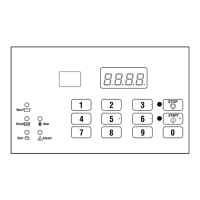
To enter, press the START (enter) keypad. The display will show
dxxx . The xxx will be the average drain time in seconds.
To exit the Show Drain Time Test, press the #5 (<) keypad. The
control will return to the Diagnostic Testing Mode.
Temperature Sensor Display Test
This test is only available on machines equipped with heat. This
option displays the temperature sensed at the sensor.
To start test, control must be in the Diagnostic Testing Mode. Re-
fer to How to Enter Diagnostic Testing Feature at the beginning
of this section.
To enter, press the START (enter) keypad. The display will show
xxxF for the temperature in degrees Fahrenheit or xxxC for the
temperature in degrees Celcius. The display will show SH if the
sensor is shorted or oP if the control senses an open sensor.
To exit the Temperature Sensor Display Test, press the #5 (<)
keypad. The control will return to the Diagnostic Testing Mode.
VFD Balance Input Test (Design 1 models)
This option tests the VFD balance switch.
To start test, control must be in the Diagnostic Testing Mode. Re-
fer to How to Enter Diagnostic Testing Feature at the beginning
of this section.
To enter, press the START (enter) keypad. If the VFD balance
switch is open, indicating poor balance, the display will show
bAoP. If the switch is closed, indicating good balance, the dis-
play will show bACL.
To exit the test, press the #5 (<) keypad. The control will return
to the Diagnostic Testing Mode.
24 VAC Switch Input Test (Design 1 models)
This option tests the 24 VAC switch.
To start test, control must be in the Diagnostic Testing Mode. Re-
fer to How to Enter Diagnostic Testing Feature at the beginning
of this section.
To enter, press the START (enter) keypad. If the 24 VAC switch
is open, the display will show ACoP. If the switch is closed, the
display will show ACCL.
To exit the test, press the #5 (<) keypad. The control will return
to the Diagnostic Testing Mode.
VFD Drive Fault Input Test (Design 1 models)
This option tests the drive fault input.
To start test, control must be in the Diagnostic Testing Mode. Re-
fer to How to Enter Diagnostic Testing Feature at the beginning
of this section.
To enter, press the START (enter) keypad. If the drive fault input
is open, the display will show dFoP. If the switch is closed, the
display will show dFCL.
To exit the test, press the #5 (<) keypad. The control will return
to the Diagnostic Testing Mode.
Frame Stability Switch Input Test
This option tests the frame balance switch.
To start test, control must be in the Diagnostic Testing Mode. Re-
fer to How to Enter Diagnostic Testing Feature at the beginning
of this section.
To enter, press the START (enter) keypad. If the frame balance
switch is open, the display will show FSoP. If the switch is
closed, the display will show FSCL.
To exit the test, press the #5 (<) keypad. The control will return
to the Diagnostic Testing Mode.
VFD Balance Weight Test (Design 1 models)
This test is only available on machines equipped with a variable
frequency motor drive.
To start test, control must be in the Diagnostic Testing Mode. Re-
fer to How to Enter Diagnostic Testing Feature at the beginning
of this section.
To enter, press the START (enter) keypad. The display will show
bAL and the START (enter) keypad LED will flash. Close the
door. Press the START (enter) keypad. The door will lock. The
motor will turn at distribution speed. The control monitors the
VFD balance switch for frequency and displays a corresponding
message. Refer to Table 14 .
VFD Balance
Switch Fre-
quency Description Display
0 Switch is always
closed
CLoS
1 Hz
1 H
2 Hz
2 H
3 Hz
3 H
Switch is always
open
oPEn
Table 14
Press the START (enter) keypad to stop the test. The door will
not unlock until the basket stops or the coast time has expired.
Testing Machine and Electronic Control Functions
©
Copyright, Alliance Laundry Systems LLC -
DO NOT COPY or TRANSMIT
58 Part No. F8238101ENR11


 To Next Page