Medium Water Level FnEd
This option allows the owner to program the medium water level
during fill and agitate of all cycles.
1. Control must be in Manual Mode. Refer to Entering the Man-
ual Mode.
2.
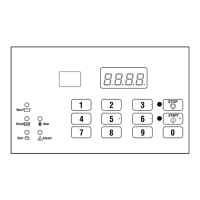
Press the #3 (∧) or the #6 (∨) keypad until Prog appears in
the display. Press the START (enter) keypad and dCYC will
appear in the display.
3. Press the #3 (∧) or the #6 (∨) keypad to scroll through the pro-
grammable options until FnEd appears in the display.
4.
When FnEd appears in the display, press the START (enter)
keypad. A number will appear in the display. This number
corresponds to the current medium water level during agitate
and fill of all cycles.
5. Press the #3 (∧) or the #6 (∨) keypad to increase or decrease
the current water level to the desired water level.
NOTE: The Medium Water Level value can be set
from 11 to 20. The default Medium Water Level is 15.
6. Press the START (enter) keypad when the correct number ap-
pears in the display. The next option, FHI, will appear in the
display.
NOTE: To program FHI (High Water Level), refer to
High Water Level FHI. To program other options, refer
to the appropriate section.
High Water Level FHI
This option allows the owner to program the high water level dur-
ing fill and agitate of all cycles.
1. Control must be in Manual Mode. Refer to Entering the Man-
ual Mode.
2.
Press the #3 (∧) or the #6 (∨) keypad until Prog appears in
the display. Press the START (enter) keypad and dCYC will
appear in the display.
3. Press the #3 (∧) or the #6 (∨) keypad to scroll through the pro-
grammable options until FHI appears in the display.
4.
When FHI appears in the display, press the START (enter)
keypad. A number will appear in the display. This number
corresponds to the current high water level during agitate and
fill of all cycles.
5. Press the #3 (∧) or the #6 (∨) keypad to increase or decrease
the current water level to the desired water level.
NOTE: The High Water Level value can be set from
21 to 30. The default High Water Level is 27.
6. Press the START (enter) keypad when the correct number ap-
pears in the display. The next option, tCF, will appear in the
display.
NOTE: To program tCF (Temperature Controlled
Fill), refer to Temperature Controlled Fill Enable/Disable
tCF. To program other options, refer to the appropri-
ate section.
Programming Control
©
Copyright, Alliance Laundry Systems LLC -
DO NOT COPY or TRANSMIT
50 Part No. F8238101ENR11


 To Next Page