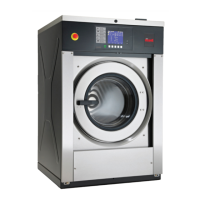
Cold Water Temperature FC
This option allows the owner to program the cold water tempera-
ture for models equipped with heat.
1. Control must be in Manual Mode. Refer to Entering the Man-
ual Mode.
2.
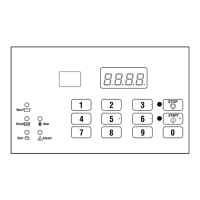
Press the #3 (∧) or the #6 (∨) keypad until Prog appears in
the display. Press the START (enter) keypad and dCYC will
appear in the display.
3. Press the #3 (∧) or the #6 (∨) keypad to scroll through the pro-
grammable options until FC appears in the display.
4.
When FC appears in the display, press the START (enter) key-
pad. A number will appear in the display. This number corre-
sponds to the current Cold Water Temperature value.
5. Press the #3 (∧) or the #6 (∨) keypad to increase or decrease
the current Cold Water Temperature value to the desired Cold
Water Temperature value.
NOTE: Cold Water Temperature is selectable be-
tween 35° and 194° Fahrenheit [2° and 90° Celsius].
Default temperature value is 35° Fahrenheit [2° Cel-
sius].
WARNING
To prevent personal injury, avoid contact with in-
let water temperatures higher than 125° Fahren-
heit [51° Celsius] and hot surfaces.
W748
NOTE: Refer to Fahrenheit/Celsius t FC to select Cel-
sius or Fahrenheit display.
6. Press the START (enter) keypad when the correct number ap-
pears in the display. The next option, Codn, will appear in the
display.
NOTE: To program Codn (Cooldown Enable/Temper-
ature), refer to Cooldown Enable/Temperature Codn . To
program other options, refer to the appropriate sec-
tion.
Cooldown Enable/Temperature Codn
This option allows the owner to enable or disable the Cooldown
Water Temperature option. If enabled, the owner can also set the
cooldown water temperature.
1. Control must be in Manual Mode. Refer to Entering the Man-
ual Mode.
2.
Press the #3 (∧) or the #6 (∨) keypad until Prog appears in
the display. Press the START (enter) keypad and dCYC will
appear in the display.
3. Press the #3 (∧) or the #6 (∨) keypad to scroll through the pro-
grammable options until Codn appears in the display.
4.
When Codn appears in the display, press the START (enter)
keypad. A number or oFF will appear in the display. The
number corresponds to the current Cooldown Water Tempera-
ture value, and oFF appears when cool down is disabled.
5. Press the #3 (∧) or the #6 (∨) keypad to change the current
status.
NOTE: Cooldown Water Temperature is selectable
between 50° and 160° Fahrenheit [10° and 71° Cel-
sius]. Default is temperature value oFF.
6. Press the START (enter) keypad when the desired value ap-
pears in the display.
NOTE: Refer to Fahrenheit/Celsius t FC to select Cel-
sius or Fahrenheit display.
7. Press the START (enter) keypad when the correct number ap-
pears in the display. The next option, PtEn, will appear in the
display.
NOTE: To program PtEn (Production Test Cycle [En-
able/ Disable]), refer to Production Test Cycle (Enable/
Disable) PtEn. To program other options, refer to the
appropriate section.
Programming Control
©
Copyright, Alliance Laundry Systems LLC -
DO NOT COPY or TRANSMIT
44 Part No. F8238101ENR11


 To Next Page