Audio Signal AUd
This option allows the owner to program when the signal will
sound.
The occasions when a signal may sound during operation are list-
ed below:
• End of Cycle Signal - By default, the signal is turned off. If
turned on, the signal will sound for three (3) seconds at the
end of a cycle.
• Keypad Depression Signal - By default, this signal is turned
on and will sound for a quarter of a second. This signal will
sound each time a keypad is pressed.
1. Control must be in Manual Mode. Refer to Entering the Man-
ual Mode.
2.
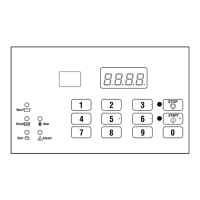
Press the #3 (∧) or the #6 (∨) keypad until Prog appears in
the display. Press the START (enter) keypad and dCYC will
appear in the display.
3. Press the #3 (∧) or the #6 (∨) keypad to scroll through the pro-
grammable options until AUd appears in the display.
4.
When AUd appears in the display press the START (enter)
keypad. A number will appear in the display. This number
corresponds to the current Audio Signal Programming Value.
5. Locate the desired number in the first column of Table 2 .
6. Press the #3 (∧) or the #6 (∨) keypad to increase or decrease
the current number until correct.
For Example: A user might wish to have the signal sound only
when a keypad is pressed. Entering the number 1 in step 5 would
turn off all the options except KEYPAD. In this instance, the sig-
nal would sound only when a keypad is pressed.
7. Press the START (enter) keypad when the correct number ap-
pears in the display. The next option, Err-, will appear in the
display.
NOTE: To program Err- (Errors), refer to Error Code
Programming Err-. To program other options, refer to
the appropriate section.
How to Read Audio Signal Chart
To determine the correct number required to program the Audio
Signal, use the following chart. The Signal Value column con-
tains the number required in step 6. The other columns corre-
spond to individual options.
Each column of options contains a unique combination of the
words ON and OFF that indicates if that column’s option is
turned on or off when the Signal Value is entered. Select the de-
sired combination of options and enter the number found in the
Signal Value column.
Audio Signal (AUd) Chart
Signal Value
Start Mode
(Not Used)
Remove Card
(Not Used)
Coin/Card In-
put (Not
Used)
End of Cycle Key Pressed
0 OFF OFF OFF OFF OFF
1 OFF OFF OFF OFF ON
2 OFF OFF OFF ON OFF
3 OFF OFF OFF ON ON
4 OFF OFF ON OFF OFF
5 OFF OFF ON OFF ON
6 OFF OFF ON ON OFF
7 OFF OFF ON ON ON
8 OFF ON OFF OFF OFF
9 OFF ON OFF OFF ON
10 OFF ON OFF ON OFF
11 OFF ON OFF ON ON
12 OFF ON ON OFF OFF
Table 2 continues...
Programming Control
©
Copyright, Alliance Laundry Systems LLC -
DO NOT COPY or TRANSMIT
28 Part No. F8238101ENR11


 To Next Page