Hot Water Temperature FH
This option allows the owner to program the hot water tempera-
ture for models equipped with heat.
1. Control must be in Manual Mode. Refer to Entering the Man-
ual Mode.
2.
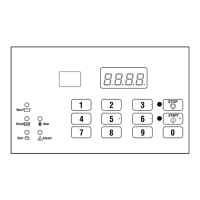
Press the #3 (∧) or the #6 (∨) keypad until Prog appears in
the display. Press the START (enter) keypad and dCYC will
appear in the display.
3. Press the #3 (∧) or the #6 (∨) keypad to scroll through the pro-
grammable options until FH appears in the display.
4.
When FH appears in the display, press the START (enter) key-
pad. A number will appear in the display. This number corre-
sponds to the current Hot Water Temperature value.
5. Press the #3 (∧) or the #6 (∨) keypad to increase or decrease
the current Hot Water Temperature value to the desired Hot
Water Temperature value.
WARNING
To prevent personal injury, avoid contact with in-
let water temperatures higher than 125° Fahren-
heit [51° Celsius] and hot surfaces.
W748
NOTE: Hot Water Temperature is selectable between
35° and 194° Fahrenheit [2° and 90° Celsius]. Default
temperature is 140° Fahrenheit [60° Celsius].
NOTE: Refer to Fahrenheit/Celsius t FC to select Cel-
sius or Fahrenheit display.
6. Press the START (enter) keypad when the correct number ap-
pears in the display. The next option, FHC, will appear in the
display.
NOTE: To program FHC (Warm Water Temperature),
refer to Warm Water Temperature FHC. To program oth-
er options, refer to the appropriate section.
Warm Water Temperature FHC
This option allows the owner to program the warm water temper-
ature for models equipped with heat.
1. Control must be in Manual Mode. Refer to Entering the Man-
ual Mode.
2.
Press the #3 (∧) or the #6 (∨) keypad until Prog appears in
the display. Press the START (enter) keypad and dCYC will
appear in the display.
3. Press the #3 (∧) or the #6 (∨) keypad to scroll through the pro-
grammable options until FHC appears in the display.
4.
When FHC appears in the display, press the START (enter)
keypad. A number will appear in the display. This number
corresponds to the current Warm Water Temperature value.
5. Press the #3 (∧) or the #6 (∨) keypad to increase or decrease
the current Warm Water Temperature value to the desired
Warm Water Temperature value.
NOTE: Warm Water Temperature is selectable be-
tween 35° and 194° Fahrenheit [2° and 90° Celsius].
Default temperature is 100° Fahrenheit [38° Celsius].
WARNING
To prevent personal injury, avoid contact with in-
let water temperatures higher than 125° Fahren-
heit [51° Celsius] and hot surfaces.
W748
NOTE: Refer to Fahrenheit/Celsius t FC to select Cel-
sius or Fahrenheit display.
6. Press the START (enter) keypad when the correct number ap-
pears in the display. The next option, FC, will appear in the
display.
NOTE: To program FC (Cold Water Temperature), re-
fer to Cold Water Temperature FC. To program other
options, refer to the appropriate section.
Programming Control
©
Copyright, Alliance Laundry Systems LLC -
DO NOT COPY or TRANSMIT
43 Part No. F8238101ENR11


 To Next Page