Error Code Programming Err-
This option allows the owner to turn on or turn off certain errors
in the control.
1. Control must be in Manual Mode. Refer to Entering the Man-
ual Mode.
2.
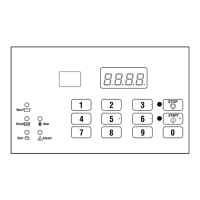
Press the #3 (∧) or the #6 (∨) keypad until Prog appears in
the display. Press the START (enter) keypad and dCYC will
appear in the display.
3. Press the #3 (∧) or the #6 (∨) keypad to scroll through the pro-
grammable options until Err- appears in the display.
4.
When Err- appears in the display, press the START (enter)
keypad. Refer to Table 3 for a list of programmable error code
parameters.
5. Press the #3 (∧) or the #6 (∨) keypad to select error code.
6. Press the START (enter) keypad when the correct code ap-
pears in the display. The current status will appear in the dis-
play.
on = Option Enabled
oFF = Option Disabled
7. Press the #3 (∧) or the #6 (∨) keypad to change the status.
8. Press the START (enter) keypad when the correct status ap-
pears in the display. The next Error Code Programming op-
tion will appear in the display.
NOTE: To program Cy-- (Cycle Programming),
press the #5 (<) keypad, then the #3 (∧) keypad and
refer to Cycle Programming Cy--. To program other op-
tions, refer to the appropriate section.
Error Parameters
E FL
Fill Error
E dr
Drain Error
E Ub
Unbalance Error Display (VFD models on-
ly)
Table 3 continues...
Error Parameters
E oP
Open Thermistor Error Display
E SH
Shorted Thermistor Error Display
E Ht
Heat Error Display (heater only)
LEr-
Leak Detection Error
If Water Leak Detection during a machine
cycle is enabled, then, on the enabled day(s)
of the week, the control will check for water
leaks during running machine cycles. If a
leak is detected, the control will display the
E Ld error for one (1) minute after the cycle
is completed. It will also light the right-most
decimal point on the display. The Water
Leak Detection diagnostic test can be used to
verify the leak.
LEr1
Water Leak Detection During a
Machine Cycle –Determines if wa-
ter level drops below target level.
LEr2
Water Leak Detection During a
Machine Cycle– Day of Week En-
able (Refer to Table 4 ).
LEr3
Number of cycles between Leak
Detection Tests.
E Sd
Slow Drain Detection – Determines if ma-
chine is draining slower than normal.
If Slow Drain Detection is enabled, the con-
trol will check for slow drain operation dur-
ing running machine cycles. If a slow drain
is detected, the control will display the E Sd
error for one (1) minute after the cycle is
completed. It will also light the right-most
decimal point on the display.
Table 3
Programming Control
©
Copyright, Alliance Laundry Systems LLC -
DO NOT COPY or TRANSMIT
30 Part No. F8238101ENR11


 To Next Page