Set Real-Time Clock rtC-
This option allows the owner to set the control’s internal clock to
the correct time and date.
1. Control must be in Manual Mode. Refer to Entering the Man-
ual Mode.
2.
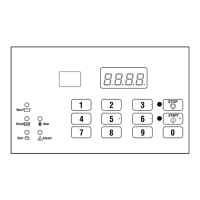
Press the #3 (∧) or the #6 (∨) keypad until Prog appears in
the display. Press the START (enter) keypad and dCYC will
appear in the display.
3. Press the #3 (∧) or the #6 (∨) keypad to scroll through the pro-
grammable options until rtC- appears in the display. Press
the START (enter) keypad and rtC1 will appear in the dis-
play.
4. Press the #3 (∧) or the #6 (∨) keypad to scroll through the pro-
grammable options. Refer to Table 10 .
Programmable Options
rtC1
Programs Minutes (0-59)
rtC2
Programs Hours (0-23)
rtC3
Programs Day of Week (1-7)
rtC4
Programs Date of Month (1-31)
rtC5
Programs Month (1-12)
rtC6
Programs Year (0-99)
rtC7 Programs Daylight Saving (on*/oFF)
*Factory default setting
Table 10
5. When the desired option appears in the display, press the
START (enter) keypad. The current value will appear in the
display.
6. Press the #3 (∧) or the #6 (∨) keypad to increase or decrease
the minutes, hours, day of week, date of the month, month,
year to the correct time or date.
NOTE: The hours will be displayed in military time.
For day of week, Sunday is considered day one ,
Monday is day two and so on. For year, the year
2000 is 00, the year 2001 is 01 and so on.
If programming Daylight Saving, rtC7, on enables Daylight
Saving Time and oFF disables Daylight Saving Time.
7. Press the START (enter) keypad when the correct time or date
appears in the display. The next Set Real-Time Clock option
will appear in the display.
NOTE: To program dAEn (Manual Diagnostics [Ena-
ble/Disable]), press the #5 (<) keypad and refer to
Manual Diagnostics (Enable/Disable) dAEn. To program
other options, refer to the appropriate section.
Programming Control
©
Copyright, Alliance Laundry Systems LLC -
DO NOT COPY or TRANSMIT
48 Part No. F8238101ENR11


 To Next Page