Operating manual ALPHASEAPILOT MFC Issue 1.1 Page 45 of 84
ALPHASEAPILOT MFC
2.15 The Control Unit Operational Display
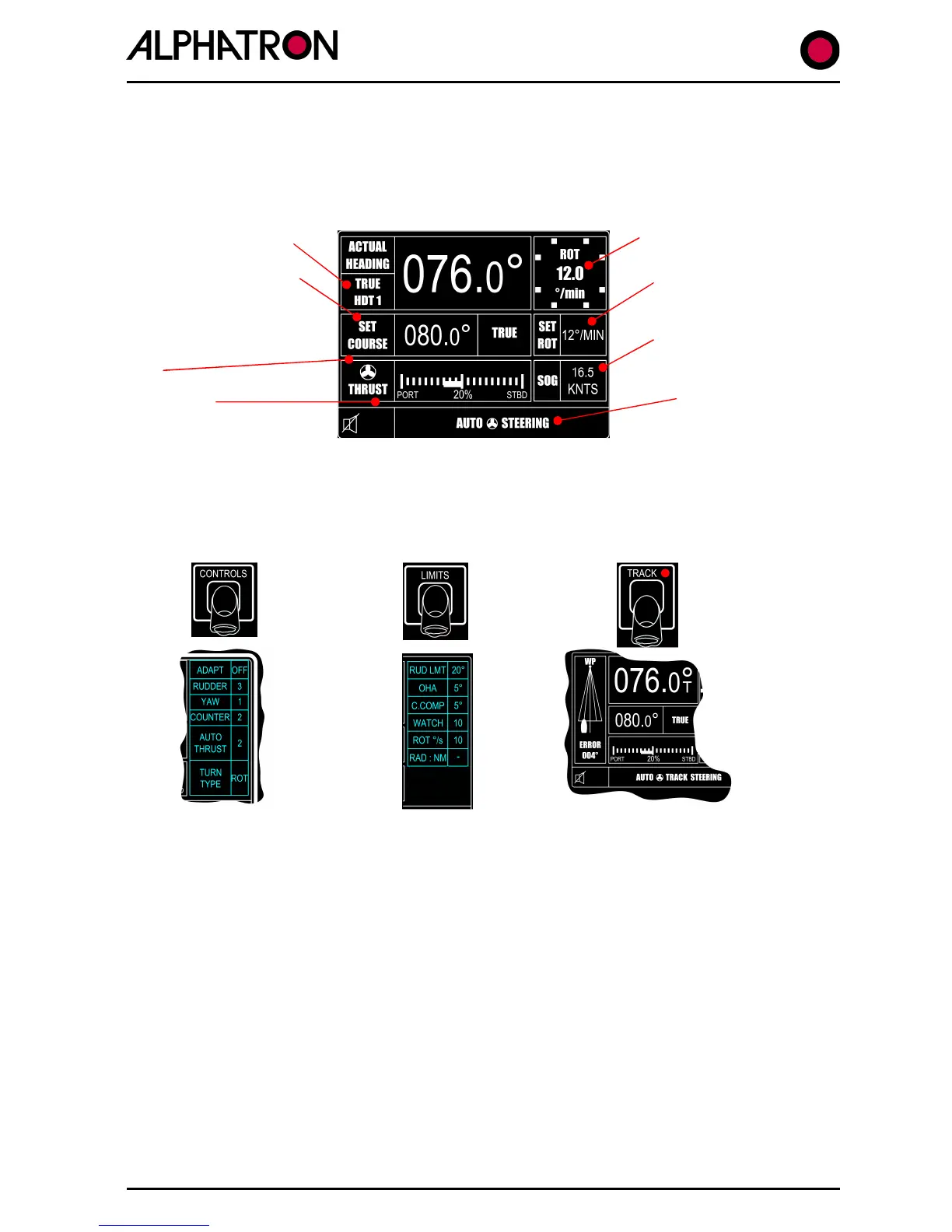
During normal steering operation, the Autopilot display will continuously show Actual values and
Limit settings etc. as follows:-
Heading data/source
Autopilot Course Set Set Radius/
(& New Course via Rate of Turn
Rudder and/or Thruster
data
(STW or SOG)
Alarm type
Use of the CONTROLS key will display the Controls Menu and use of the LIMITS key will
display the Limits Menu on the right hand side of the normal operational display.
Track Mode operation selected via the TRACK key will result in display of the track graphic on
the left hand side of the operational display :-
The Control Unit display also provides reference to the comprehensive installation “Set Up”
Menu (Installation and Technical Manual Section 3) and is accessed via simultaneous 5 second
operation of the CANCEL and CONFIRM keys.



 To Next Page