Operating manual ALPHASEAPILOT MFC Issue 1.1 Page 48 of 84
ALPHASEAPILOT MFC
2.19 Initial Course Keeping Performance
Provided the Autopilot YAW value is set to No.1 (minimum Yaw) in the CONTROLS Menu,
corrective rudder will be demanded and applied by the Autopilot system for any short term yaw
angle in excess of 0.7 degree.*
* (The ultimate addition of Counter rudder and Autotrim significantly increases heading
resolution in practice – i.e. increases sensitivity to Yaw).
PORT Yaw will result in STBD rudder application confirmed by illumination of the GREEN chevron
situated immediately above the Set Course knob. Conversely Starboard Yaw will initiate PORT
rudder and the RED chevron.
The actual angle of corrective rudder applied to correct Yaw will be directly proportional to the
Yaw angle and to the Controls Menu setting of the RUDDER value.
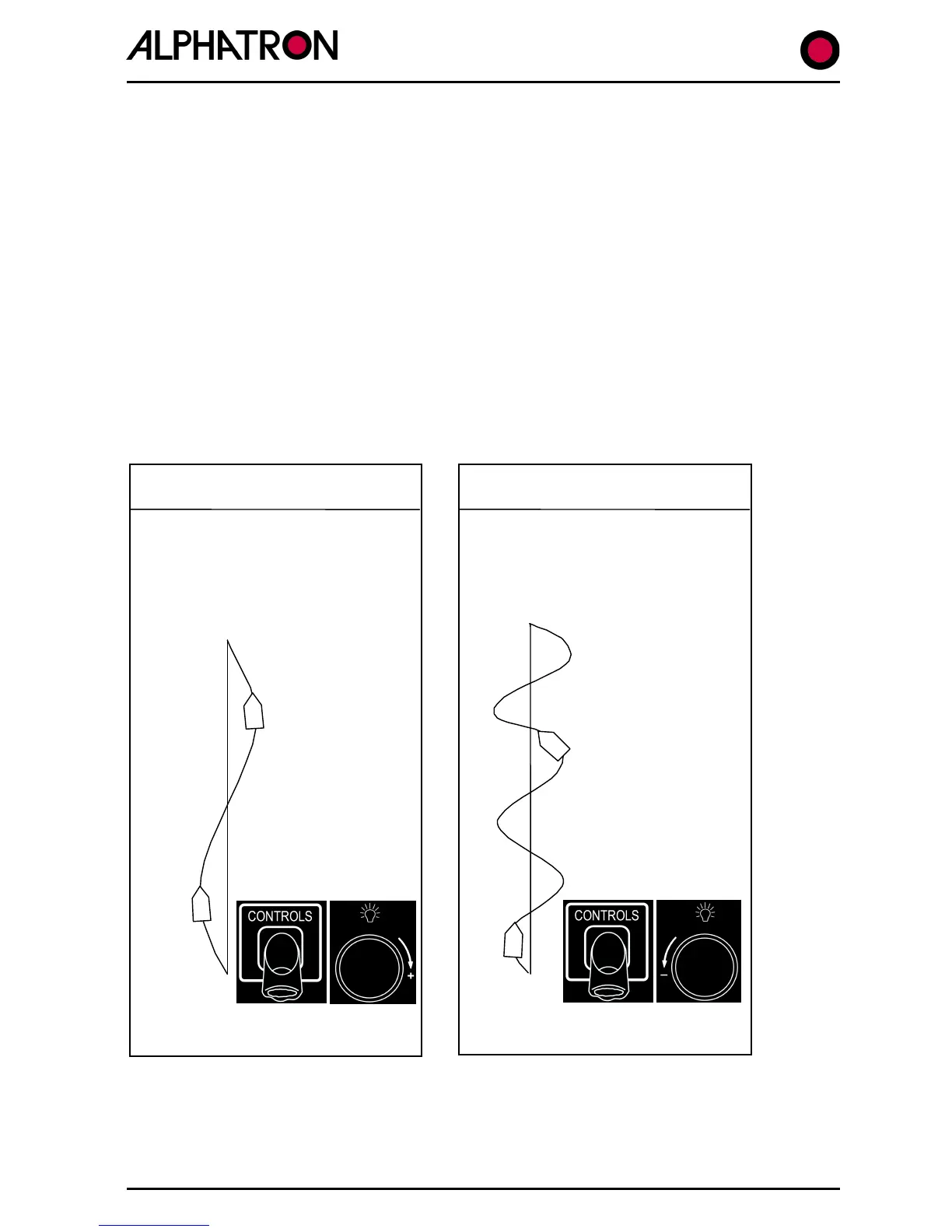
Too much applied rudder will promote OVERSTEER (Overcorrection).
Insufficient applied rudder will promote UNDERSTEER (Undercorrection).
Understeer Characteristics



 To Next Page