12
English
Basic Operation
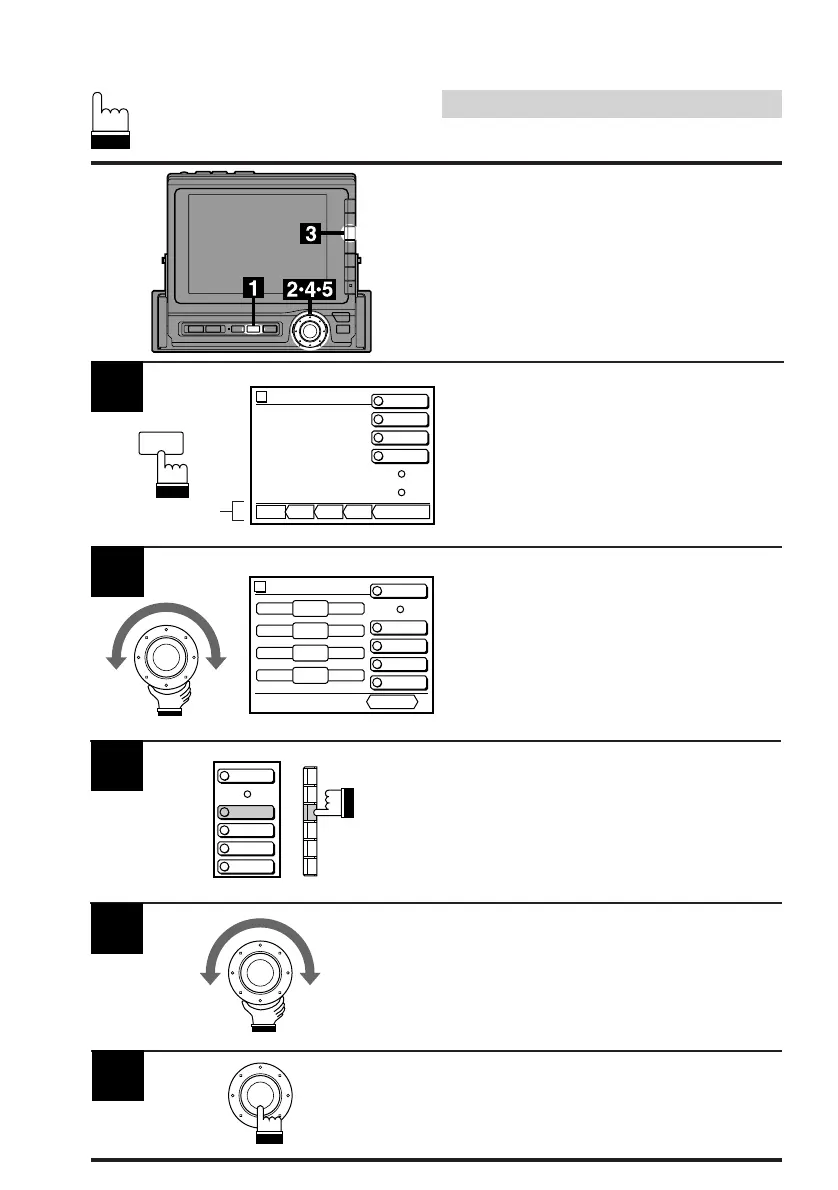
Press the SET UP button.
The Set Up screen appears.
The menu for each mode will be displayed at
the bottom of the screen.
Note: The Parking Brake must be ON to
access the SET UP screen. Trying to
access this screen while driving will
display the warning – CAN'T OPERATE
WHILE DRIVING.
Adjusting Bass
Note: When an Ai-NET compatible equalizer
is connected, the bass menu will not
appear on the screen. In this case,
adjust bass sound using the equalizer.
Turn the rotary switch clockwise or
counterclockwise to increase or decrease to
obtain the desired level of the bass sound.
4
Press the F3 (BASS) button to select the BASS
mode. The DN/RTN/UP (Down/Return/Up)
menu appears at the bottom of screen.
3
LOUDNESS
BASS
TREBLE
BALANCE
FADER
When the desired level is obtained, press the
rotary switch to set at that level.
The display returns to the set up screen.
5
Turn the rotary switch to scroll the bottom menu
and select and move "Audio cont." menu to the
extreme end of right side. Then press the rotary
switch. The audio control screen appears.
2
Audio
vol. 27
RETURN
±
0
BASS
±
0
TREBLE
0
BALANCE
0
FADER
CONT.
LOUDNESS
BASS
TREBLE
BALANCE
FADER
SET UP
SET UP
BEEP OFF
SPE-ANA OFF
CLK DISP. OFF
EQUALIZER Pops
SURROUND Stadium
B B E Custom
L P S Front–L
TIME CORR. Custom
ONSUB WOOFER
vol. 0
LPS T–CR
SubW.
SystemCont.BEE
BBEP
SPE-ANA
CLK DISP.
DEMO
menu



 To Next Page