69
English
Audio Processor
Operation
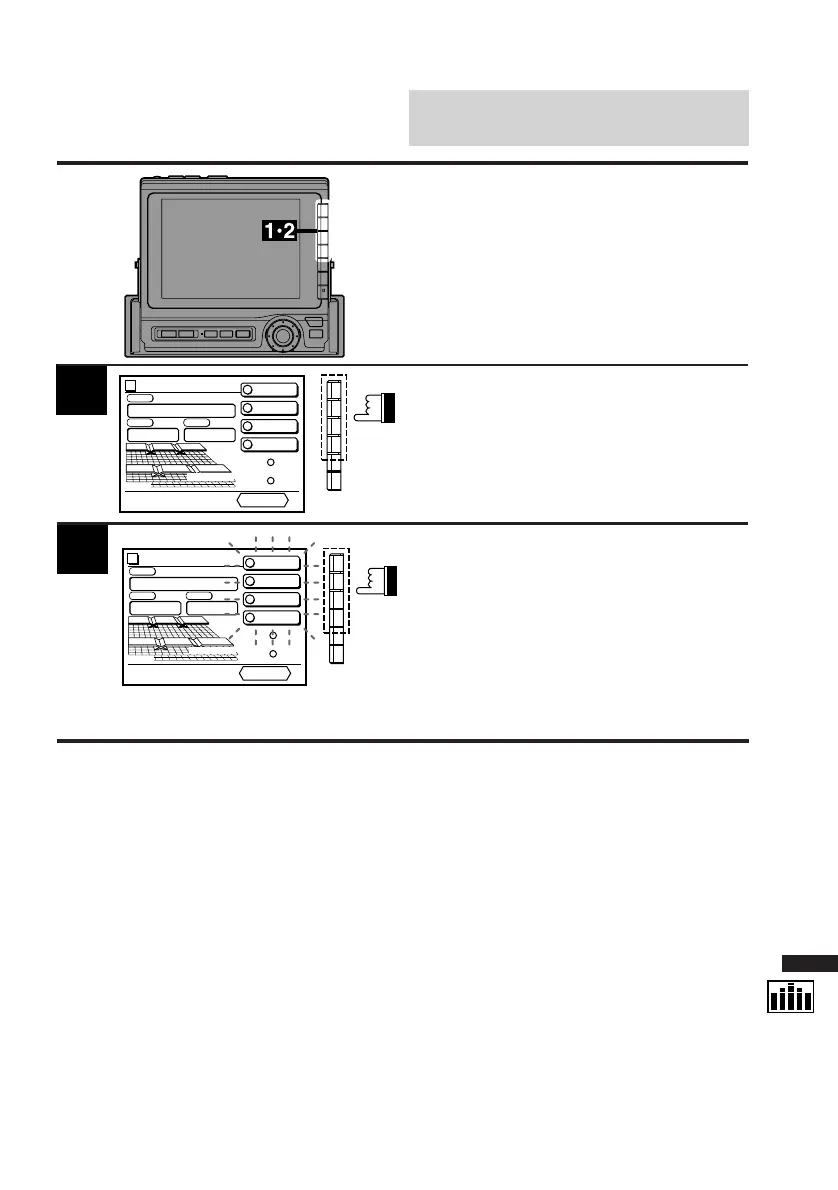
Display the DIV. cont. screen.
Press and hold one of the Function buttons F1
through F4 for at least 2 seconds.
The indicators for 4 buttons (F1-F4) blink for 5
seconds.
1
Press the Function button (F1-F4) into which
you want to memorize (preset) the divider
setting while the indicator are blinking for 5
seconds.
Repeat the above steps to memorize 3 other
divider settings.
2
Memorizing Divider
Settings
You can store your settings of the divider(s) in
memory when you have adjusted.
Divider
PRESET 2
PRESET 3
PRESET 4
C H STEP
PRESET No
.
4
PSET
RETURN
vol. 35
PRESET 1
1
2
3
4
3-WAY
This display example shows
when the F4 is selected.
Divider
PRESET 2
PRESET 3
PRESET 4
C H STEP
Custom
PSET
RETURN
vol. 35
PRESET 1
1
2
3
4
3-WAY



 To Next Page