23
English
Radio Operation
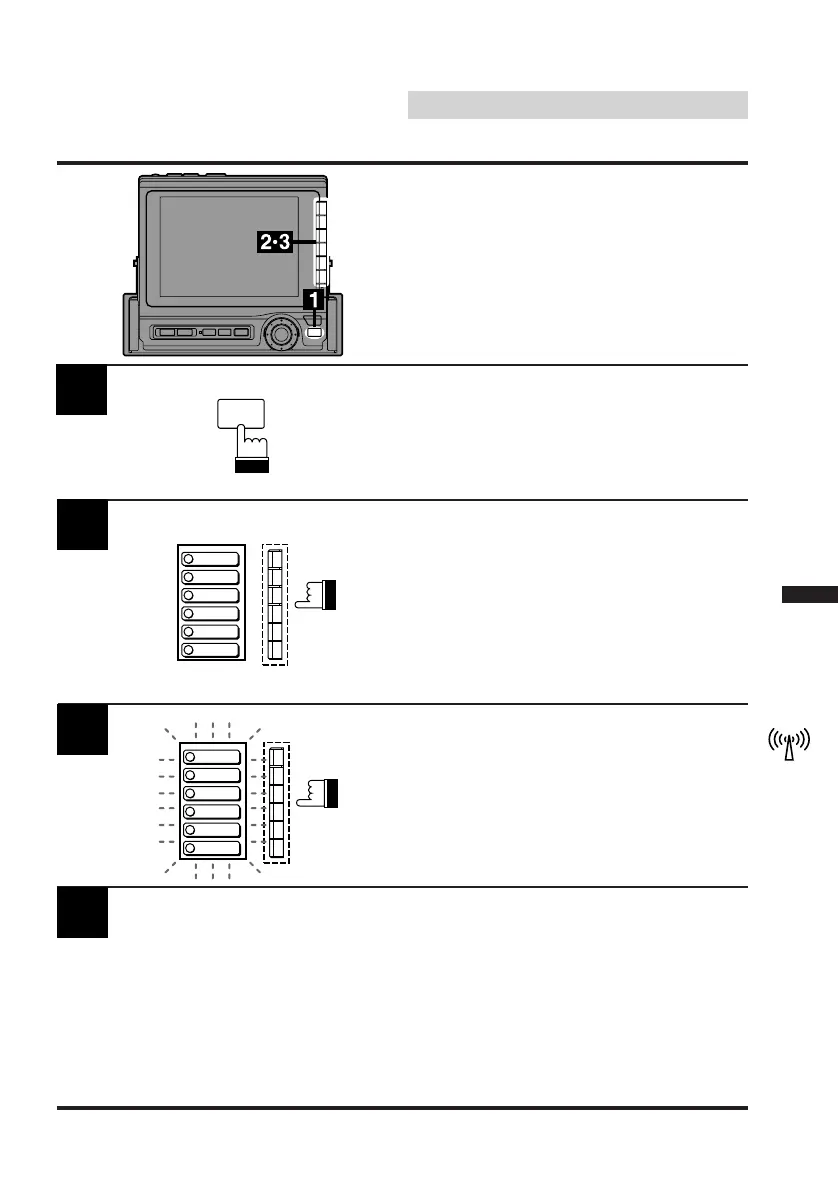
Tune in a desired radio station you wish to store
in the preset memory by manual or automatic
seek tuning.
Press the FUNC button.
Press and hold any one of the Function buttons
(F1 through F6) for at least 2 seconds until the
frequency display blinks.
2
1
Manual Storing of Station
Presets
A total of 24 stations can be stored in the preset
memory (6 stations for each band; FM1, FM2,
AM and D.A.P.).
FUNC
Press the Function button into which you wish
to store the station while the frequency display
is blinking (within 5 seconds).
The frequency display stops blinking, indicating
that the station has been memorized at the
Function button pressed.
3
4
Repeat the above procedure (1 to 3) to store 5
other stations onto the same band.
Notes: • If a preset memory has already been
set in the same Function button, it will
be cleared and the new station will be
memorized.
• The memorized stations will remain
unless the battery cables are
disconnected.
1
2
3
4
5
6
FM 87.5
FM 90.1
FM 98.1
FM 106.1
FM 108.0
FM 87.5
1
2
3
4
5
6
FM 87.5
FM 90.1
FM 98.1
FM 106.1
FM 108.0
FM 87.5



 To Next Page