English
74
Other Useful
Features
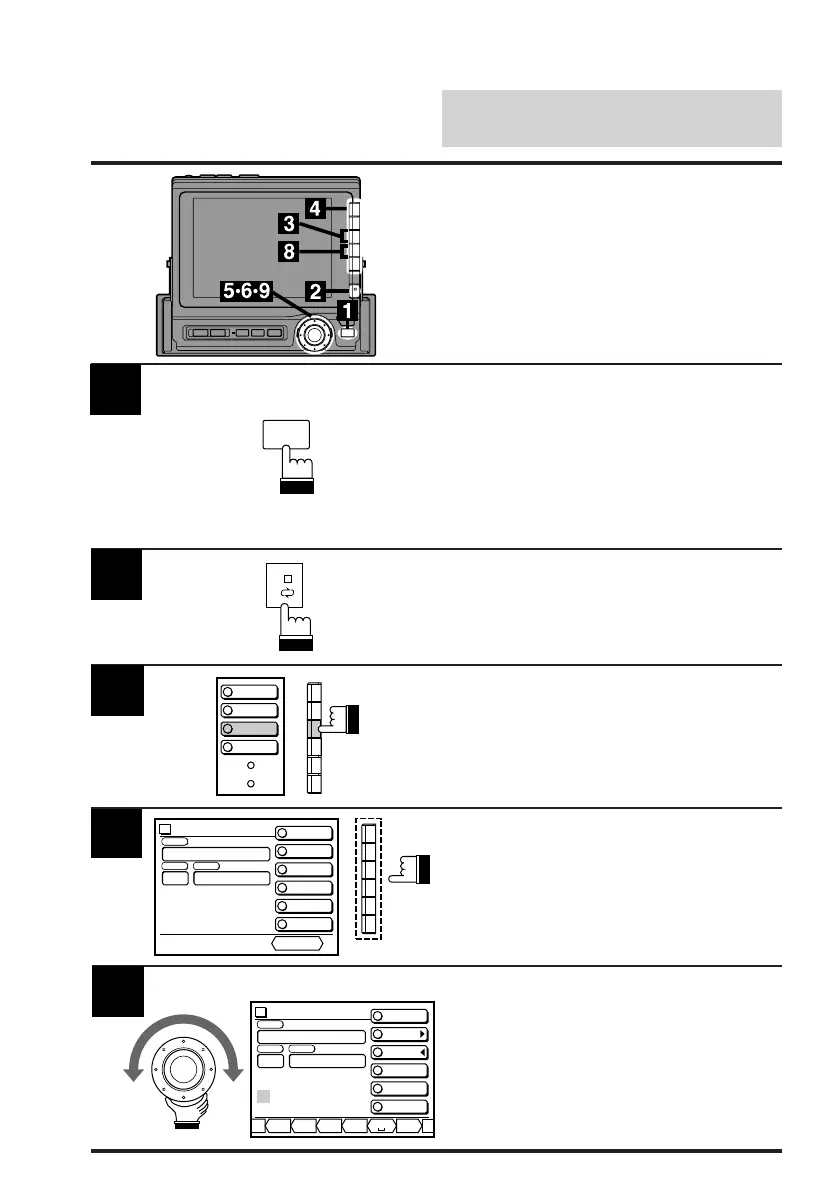
Activate the radio mode.
Press the FUNC button.
The contents of the Function Guide screen
changes.
Note: The Parking Brake must be ON to
access the TITLE mode screen. Trying
to access this screen while driving will
display the warning – CAN'T OPERATE
WHILE DRIVING.
Titling Radio Stations/CDs
You can title radio stations (up to 18 AM/FM
stations) or CDs (the number of CDs you can
title varies depending on models). This manual
explains how to title radio stations.
Press the NEXT (0/) button.
2
Press the F3 (TITLE) button.
The radio band and station frequencies are
displayed.
3
1
2
MONO
P.SCAN
4
TITLE
5
DAP
4
Select the station you want to title and press the
corresponding Function button (F1-F6).
The display changes to the Title Input screen
and the first digit position for inputting blinks.
5
Characters are displayed at the bottom menu.
Turn the rotary switch and select the desired
character for the first digit position.
To change between upper case, lower case,
numeral and symbol, press the F1 (A/a/1/&)
button. Each press changes the bottom menu.
FM-1
vol. 27
PSET FREQ
87.5
MHz
TITLE INPUT MODE
Select PreSet No.
STATION
FM 87.5
FM 90.1
FM 98.1
FM 106.1
FM 108.0
FM 87.5
RETURN
FM 87.5
1
FM-1
vol. 27
PSET FREQ
FM 87.5
87.5
MHz
TITLE INPUT MODE
STATION
A/a/1/&
NEXT
BACK
WRITE
DELETE
RETURN
–,.ZY A B
1
FUNC



 To Next Page