55
English
Audio Processor
Operation
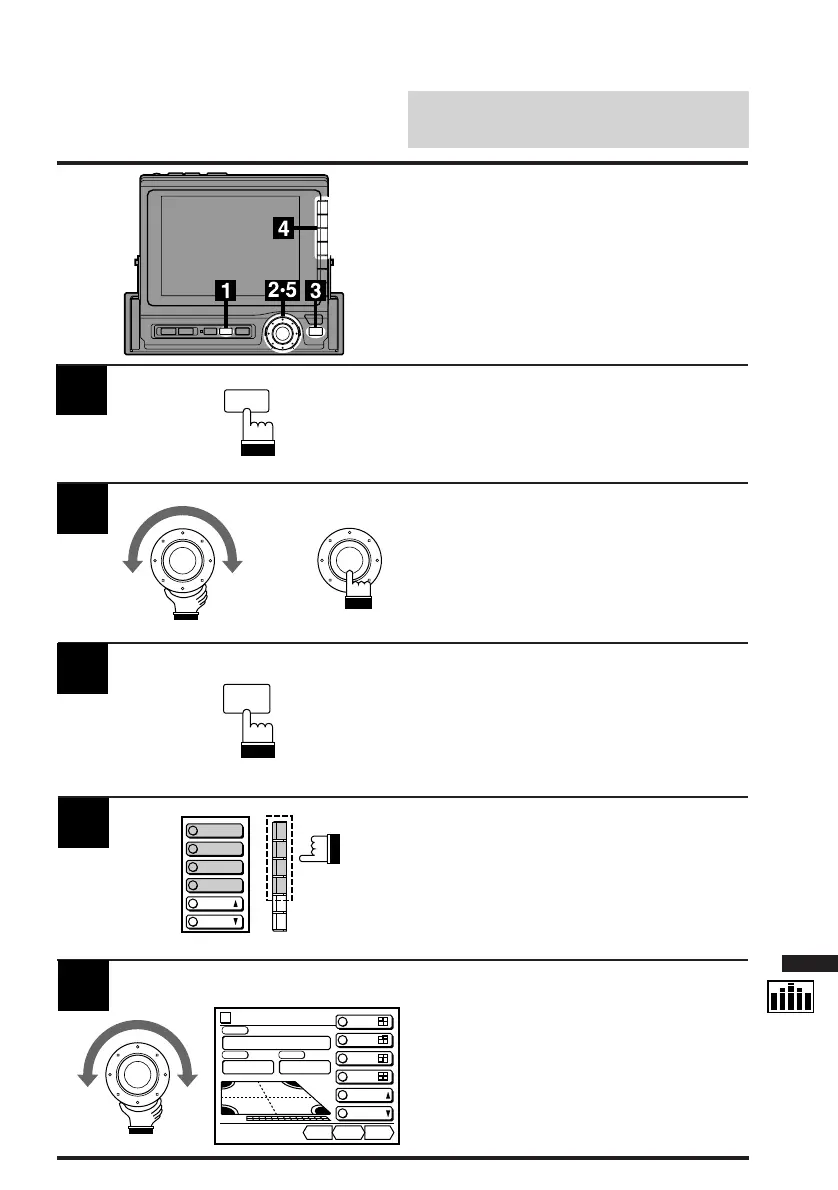
Press the SET UP button.
The Set Up screen appears.
1
Adjustment of Time
Correction Value
SET UP
Turn the rotary switch and select the "T-CR"
menu. Press the rotary switch.
The display changes to the T-CR cont. (Time-
Correction Control) screen.
2
x
Press the FUNC button.
The contents of the Function Guide screen
changes.
3
Press the Function button (F1-F4) that has the
channel you wish to adjust.
The bottom menu changes to show "DN/RTN/
UP."
4
R/L
R/R
P.UP
P.
DOWN
F/L
F/R
FUNC
Turn the rotary switch clockwise or
counterclockwise to increase or decrease the
Time-Correction value respectively to your
desired value.
5
Time Cor.
CONT.
F/L
F/R
R/L
R/R
DN RTN UP
vol. 0
POS STEP
Custom
Fr/Right
0.3
ms
PSET
P.UP
ms
0.0
0.0
0.3
0.0
P.DOWN



 To Next Page