43
English
Audio Processor
Operation
PRIVATE1
PRIVATE2
PRIVATE3
PRIVATE4
PRIVATE5
PRIVATE6
1K
1
2
3
4
5
6
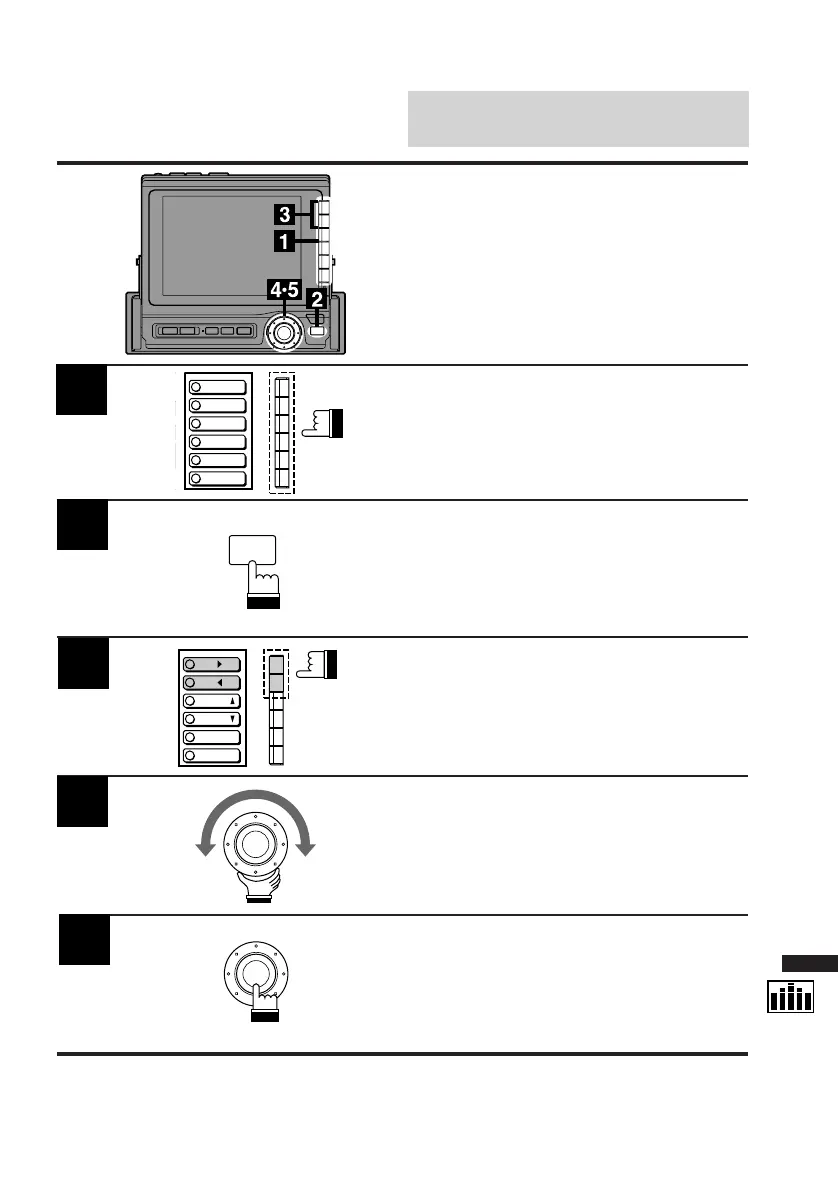
Display the EQ cont. screen as described in
Steps 1 and 2 on the previous page.
Press the Function button to select the desired
characteristic curve you wish to adjust.
Press the FUNC button.
The contents of the Function Guide screen
changes.
2
1
3
Personal (Private) Equal-
izer Characteristic
Curves
You can create your own equalizer characteris-
tic curves. The following is the procedure.
4
5
FUNC
MAKER'S
PRIVATE
P.UP
P.
DOWN
SEL
SEL
Press the F1 (SEL :) or F2 (SEL ;) button to
move to the frequency bar that you wish to
adjust.
The color of the frequency bar changes. The
menu changes to the "DN/RTN/UP" (Down/
Return/Up) menu.
Turn the rotary switch clockwise or
counterclockwise to adjust the frequency
upward or downward respectively.
Repeat the above steps to adjust other
frequencies.
When the adjustments have been completed,
press the rotary switch.
The display changes to the Set Up screen.



 To Next Page