EasyManua.ls Logo

Alpine CVA-1000E - Audio Processor Operation; Recalling Memorized Divider Settings

Alpine CVA-1000E
187 pages
Print Icon
To Next Page IconTo Next Page
To Previous Page IconTo Previous Page
Loading...
English
70
Audio Processor
Operation
1
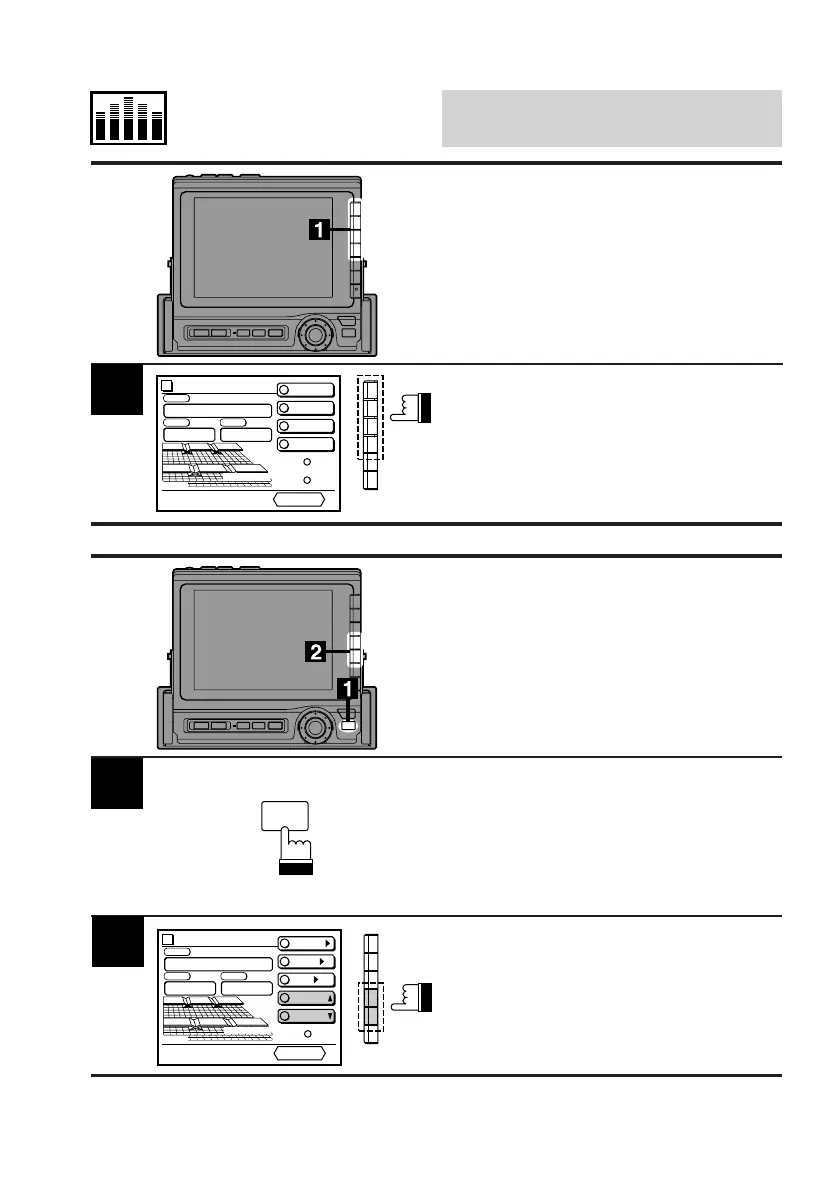
Display the DIV. cont. screen.
Press the Function button (F1-F4) that has your
desired divider setting.
1
2
Display the DIV. cont. screen.
Press the FUNC button.
Press the F4 (P.UP) or F5 (P.DOWN) button to
select the desired divider setting upward or
downward respectively.
Recalling Memorized
Divider Settings Using
Function Buttons (F1-F4)
Recalling Memorized
Divider Settings Using
P.UP/P.DOWN Buttons
Divider
PRESET 2
PRESET 3
PRESET 4
C H STEP
PRESET No
.
4
PSET
RETURN
vol. 35
PRESET 1
1
2
3
4
3-WAY
FUNC
Divider
CONT.
X-OVER/
LEVEL/
T-CR/
P.UP
P.DOWN
C H STEP
PRESET No
.
4
PSET
RETURN
vol. 35
3-WAY

Table of Contents

Related product manuals