30
EnglishEnglish
Cassette Player
Operation
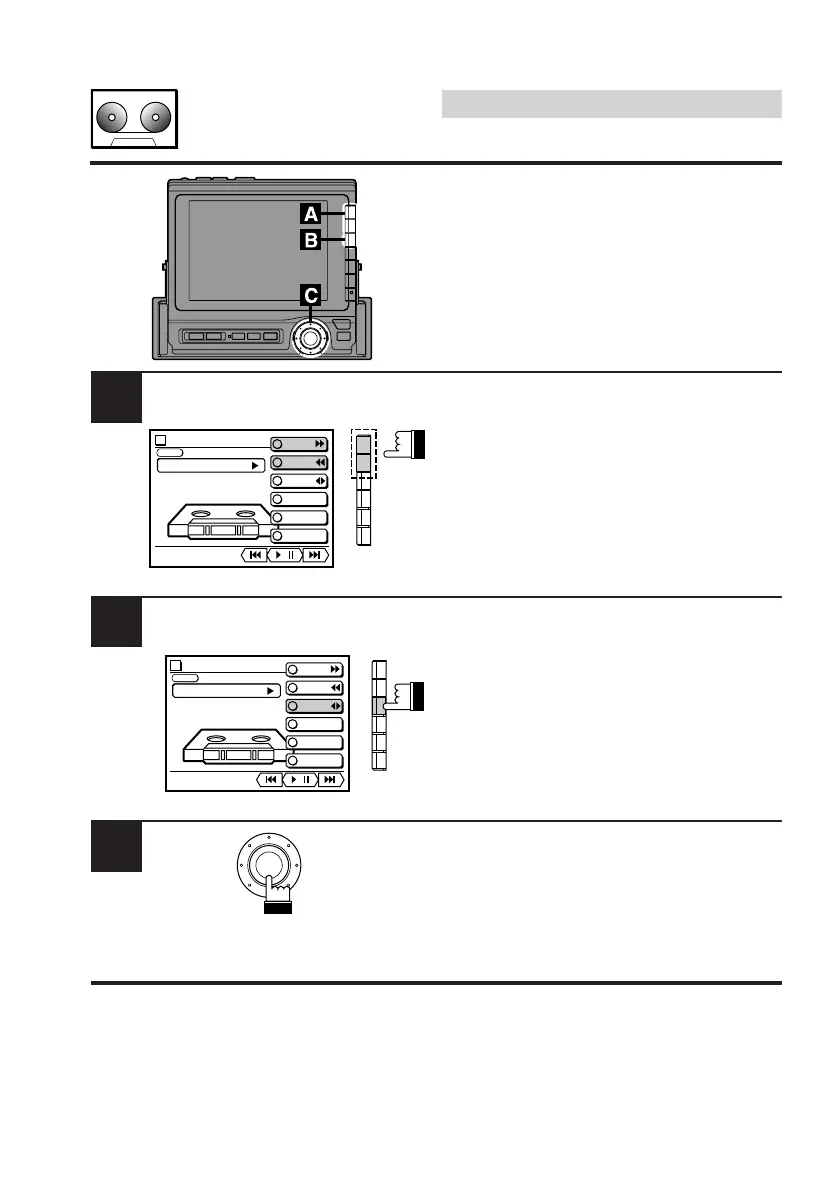
Fast-Forward/Fast-Re-
wind/Program Change/
Pause/Play
• Press the F1 (FF) button to fast forward the
tape.
• Press the F2 (REW) button to quickly rewind
the tape.
• To stop fast forwarding or quick rewinding,
press the F1 (FF) button or F2 (REW) button
respectively. Pressing the rotary switch
(PLAY/PAUSE) also stops fast forwarding or
quick rewinding.
To change the tape direction to play the
programs on the other side of the tape, press
F3 (PROG) button.
Press the rotary switch during tape play to
temporarily pause the tape play.
To resume the tape play, press the rotary
switch.
B
C
A
TAPE
vol. 0
PLAY
METAL
MODE
F F
REW
PROG
REPEAT
DOLBY NR
B.SKIP
/
TAPE
vol. 0
PLAY
METAL
MODE
F F
REW
PROG
REPEAT
DOLBY NR
B.SKIP
/



 To Next Page