151
Chapter 3 Handling
3
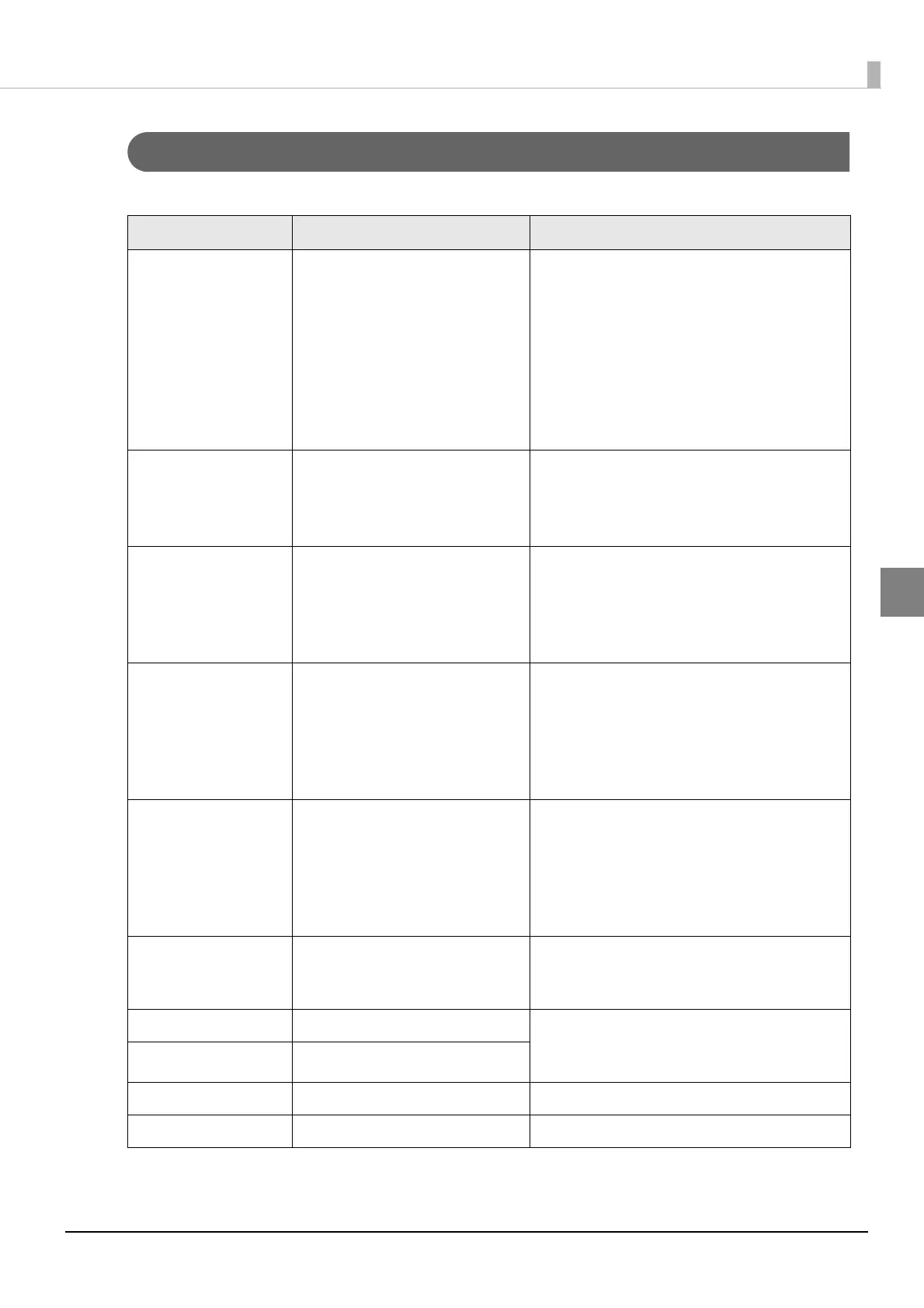
Error Recovery Method
The following table shows the error recovery methods.
LCD display Description Recovery method
MEDIA FORM ERROR
The type of the paper set in the
printer is different from the speci-
fied type set for "Media detec-
tion settings".
Set the type of paper specified for "Media
detection settings".
Change the settings for "Media detection
settings" to that is suitable for the loaded
paper.
For more information on the confirmation
method and how to make settings for
Media detection settings, see
"Media
detection settings" on page 114
MEDIA SIZE ERROR
The paper size is inappropriate
for the print area.
Set the paper whose size matches the print
area.
Change the print area to that suitable for
the loaded paper.
PAPER JAM ERR ##
##:59
Roll paper is installed to the
printer set on fanfold paper.
Set the type of paper specified for "Media
source".
Set the paper,
"Replacing Roll Paper with
Fanfold Paper" on page 66 or "Replacing
Fanfold Paper with Roll Paper" on page 75.
PAPER JAM ERR ##
##:01 to 0E, 44, 55 to
5C, 80
The paper is jammed. Check the paper path for a paper jam. If
jammed paper is found, remove it com-
pletely.
Set the paper,
"Replacing Roll Paper with
Fanfold Paper" on page 66 or "Replacing
Fanfold Paper with Roll Paper" on page 75.
PAPER JAM ERR ##
##: 81
Fanfold paper is loaded when
the media settings are set to roll
paper.
Load the paper that matches the media set-
tings.
For details on how to load paper, see
"Replacing Roll Paper with Fanfold Paper" on
page 66 or "Replacing Fanfold Paper with
Roll Paper" on page 75.
PAPER REMOVAL ER
Fanfold paper is inserted when
fanfold paper still remains in the
printer.
Pull out the fanfold paper that remains in the
paper exit. insert fanfold paper into the fan-
fold paper slot at the back of the printer.
PAPER OUT Paper is out. Set the paper,
"Replacing Roll Paper with
Fanfold Paper" on page 66 or "Replacing
Fanfold Paper with Roll Paper" on page 75.
PAPER OUT ERROR
Paper is out.
ROLL COVER OPEN The roll paper cover is open. Close the roll paper cover.
INK COVER OPEN The ink cartridge cover is open. Close the ink cartridge cover.



 To Next Page