165
Chapter 3 Handling
3
Media arrangement
Media arrangement when feeding media for printing from the first sheet
Roll paper
This can be used with the following media forms.
•Continuous paper (Blackmark)
•Die-cut label (Blackmark)
•Die-cut label (Gap)
•Transparent die-cut label
Loading Paper
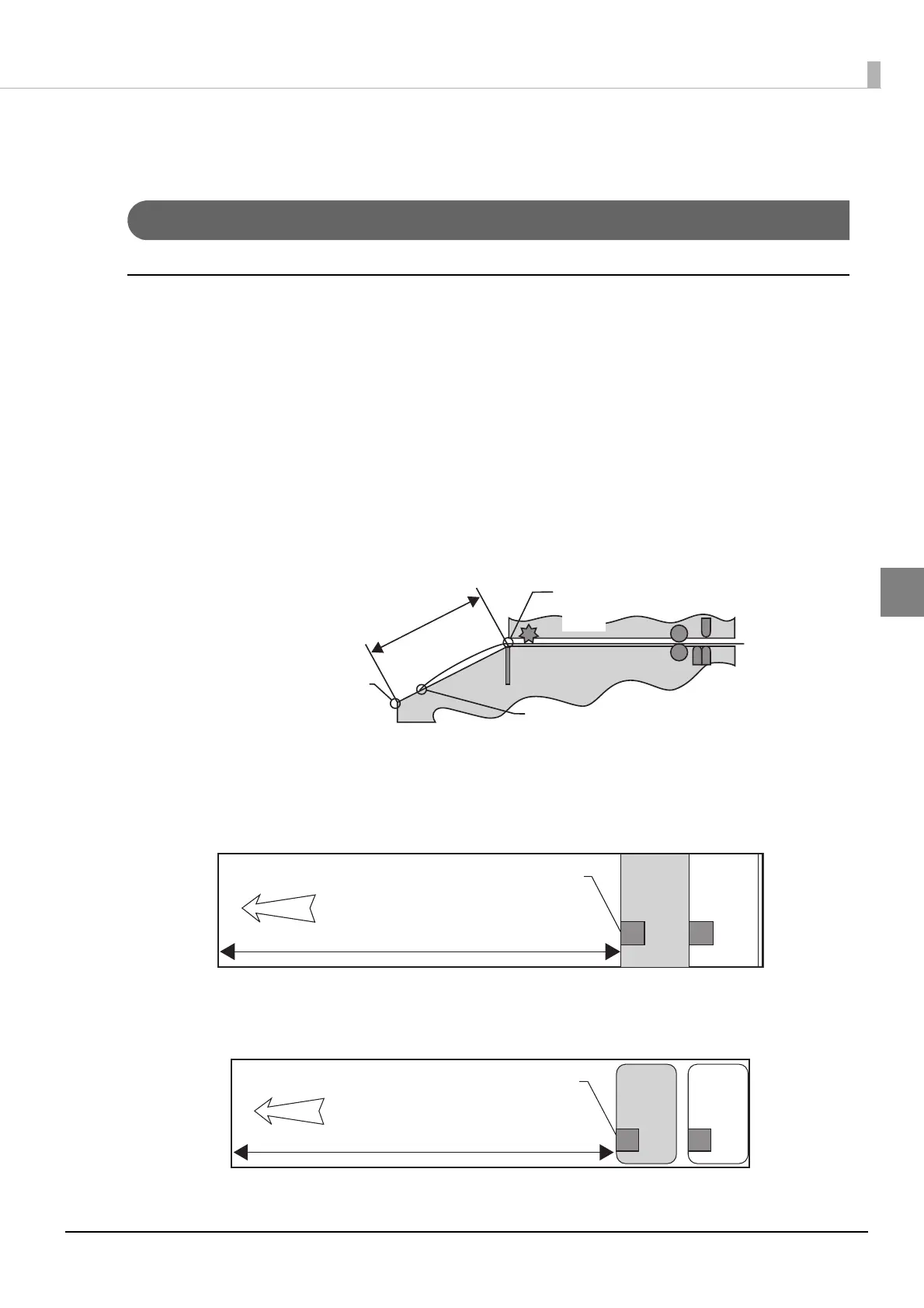
When feeding paper, bring the edge of the roll paper between the autocutting position and the edge
of the paper ejection table, then close the roll paper cover.
Method for arranging the media
•Continuous paper (Blackmark)
Place the edge of the first black mark in a position 172.5 mm {6.791”} or more from the edge of the
roll paper, and do not place a black mark before there.
•Die-cut label (Blackmark), die-cut label (gap), and transparent die-cut label
Place the edge of the first label in a position 172.5 mm {6.791”} or more from the edge of the roll
paper, and do not place a label or black mark before there, leaving only the backing.
Autocutting position
Area for the edge
of the paper
Edge of the paper
Edge of the paper
ejection table
Head
Paper feed
direction
Black mark position
172.5 mm {6.791” } or more
Paper feed
direction
Label edge
172.5 mm {6.791” } or more



 To Next Page