IS-300A
5. Installation and Connection
5-6
(4) Connection Procedure
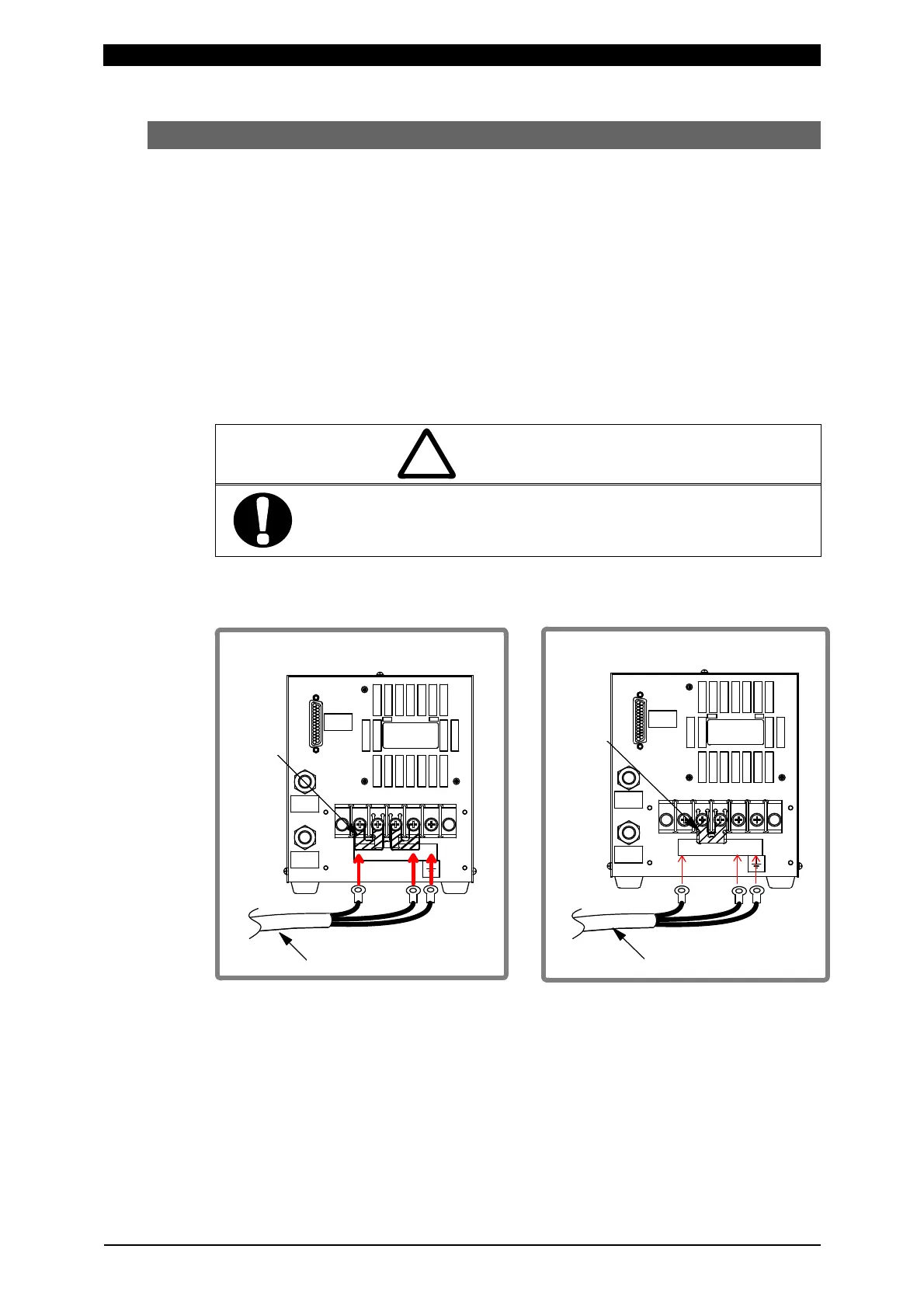
When using our dedicated transformer (ITH-651□6W)
1) Connection to the transformer’s input terminal block and [SENS] cable
Use the output cable to connect the welding power output terminal block on the
Power Supply’s rear panel with the welding transformer’s input terminal block.
For the output cable specification, see 10. (2) Options (Sold Separately).
The connection to the transformer’s input terminal block will differ depending on
the IS-300A input voltage level. For the 200 V input voltage model (200–240 V),
make the connection as shown at bottom left. For the 400 V input voltage model
(380–480 V), make the connection as shown at bottom right.
CAUTION
!
Making connections as shown at bottom left for the 400-V model
may damage the IS-300A and welding transformer.
IS-300A-00-00 IS-300A-00-01
(200 V model power supply) (400 V model power supply)
溶接トランス
ショート
ピース
34521
OUT
WATER
IN
WATER
SENS
出力ケーブル
出力ケーブル
溶接トランス
ショート
ピース
34521
OUT
WATER
IN
WATER
SENS
Shorting
element
Shorting
element
Output cable
Output cable
Welding transformer Welding transformer



 To Next Page