IS-300A
4. How to Operate Screens
4-16
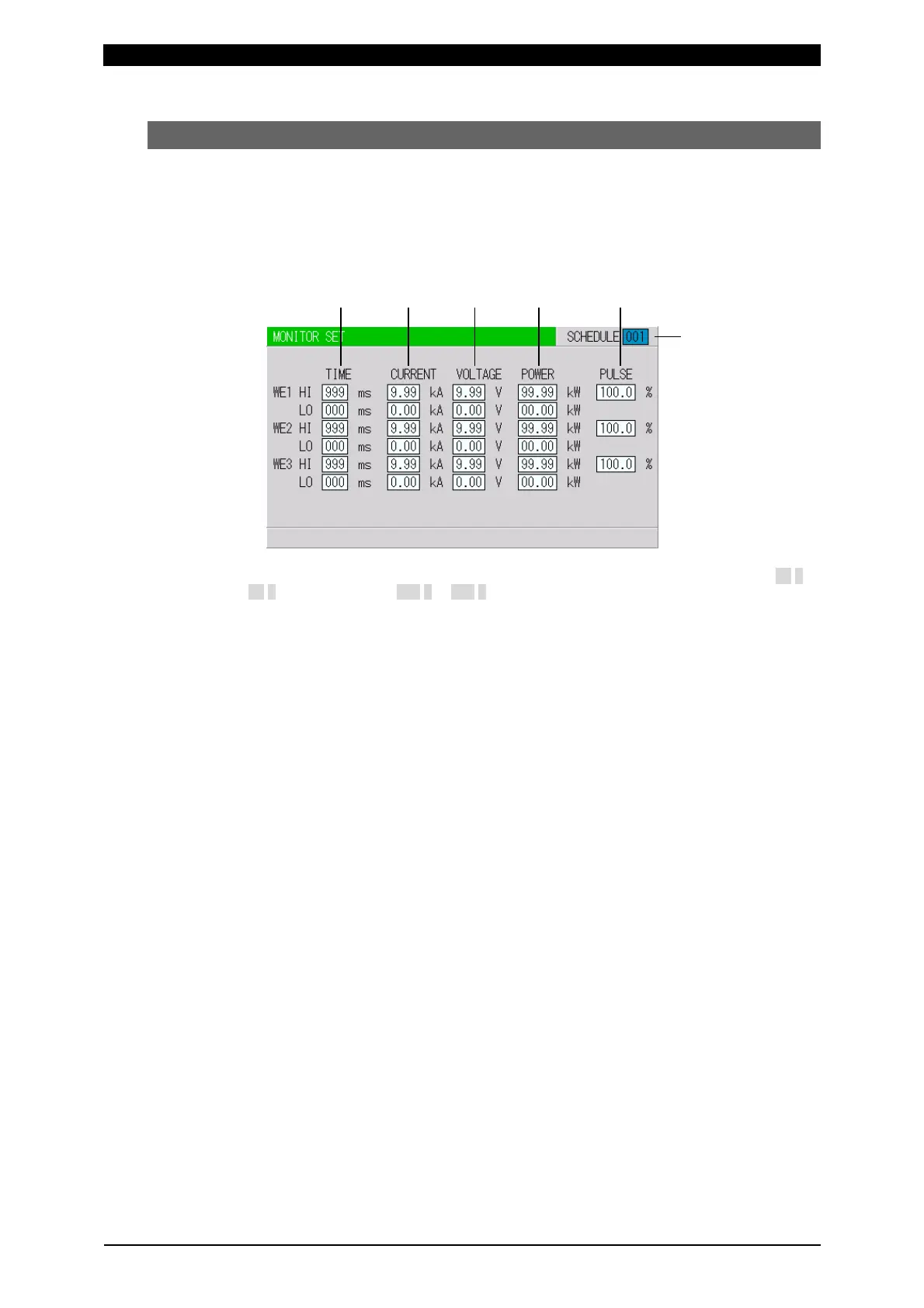
(5) MONITOR SET Screen
Set the conditions for determining a good or bad weld, including values for welding
current, upper or lower limits for the secondary voltage, etc.
If the monitored welding current, secondary voltage, etc., do not meet the set
conditions, a caution signal is output, and can be used to activate an alarm buzzer,
alarm lamp, or similar event.
(b) (c) (d) (e) (f)
(Note) The screen shows the settings for 10 kA or 5 kA range. In 20 kA range, CURRENT is 00.0 to
99.9 kA and POWER is 000.0 to 999.9 kW.
(a) SCHEDULE
Input the No. of the SCHEDULE to monitor (to set the schedules).
(b) TIME
Set the upper limit (HI) and lower limit (LO) of the weld time for each of WE1,
WE2 and WE3. Use this function to monitor the weld time when it becomes
unstable by the welding stop input.
The setting range is 0 to 999 ms or 0 to 50 CYC.
(c) CURRENT
Set the upper limit (HI) and lower limit (LO) of the welding current for each of
WE1, WE2 and WE3.
The setting range is 0 to 9.99 kA or 0 to 99.9 kA.
(d) VOLTAGE
Set the upper limit (HI) and lower limit (LO) of the secondary voltage for each of
WE1, WE2 and WE3.
The setting range is 0 to 9.99 V.
(e) POWER
Set the upper limit (HI) and lower limit (LO) of the electric power for each of WE1,
WE2 and WE3.
The setting range is 0 to 99.99 kW or 0 to 999.9 kW.
(f) PULSE
If the ratio of welding current pulse / pulse width in full wave mode exceeds the
percentage set in PULSE HIGH, an ERROR signal is output. Pulse width is
expressed assuming that the full wave is 100%.
The setting range is 10 to 100%.
(a)



 To Next Page