Structure and function, carrier vehicle
Pantera 4502 CP1_E3A_E4 BAG0166.5
5.15.12 Air conditioner
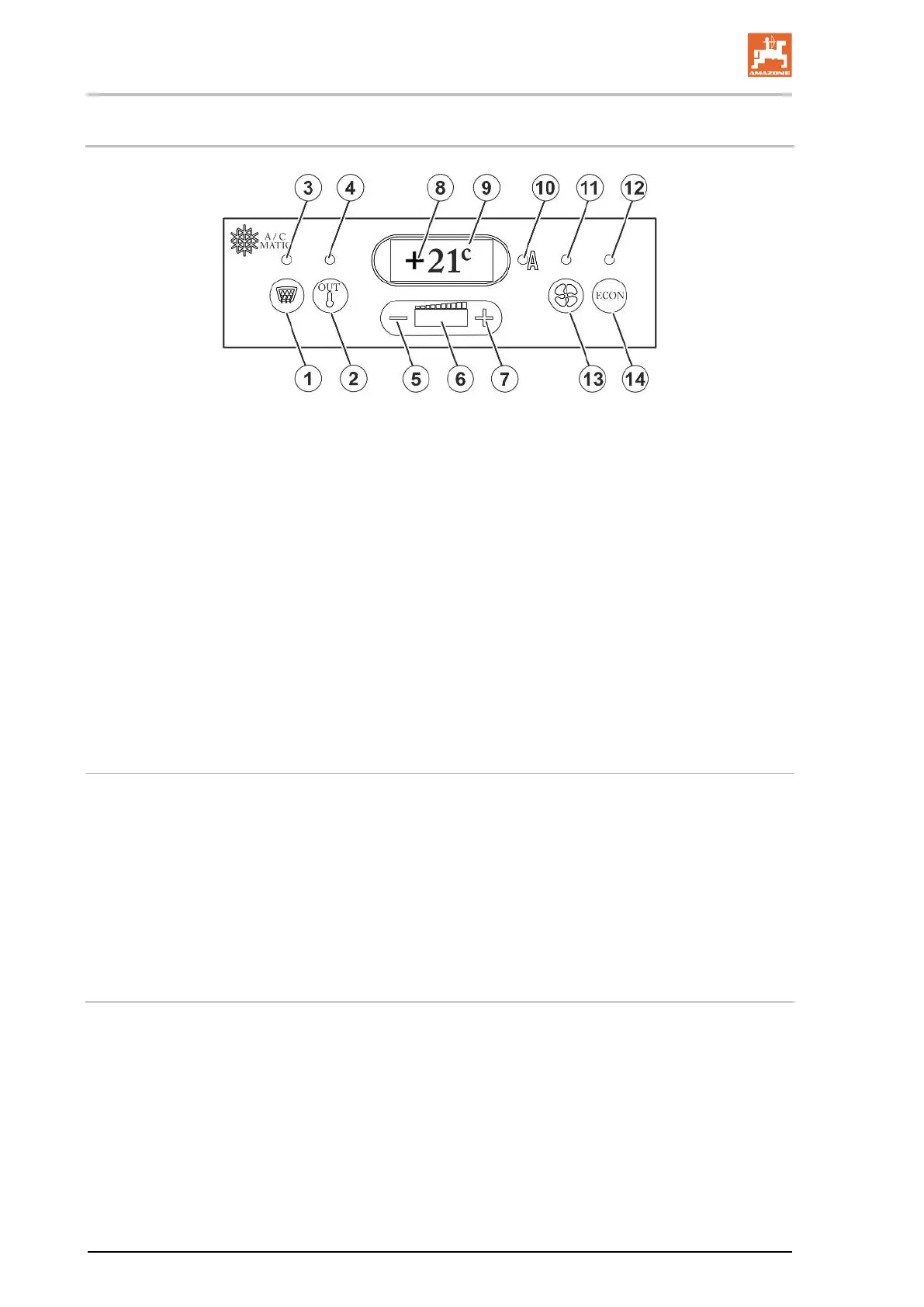
Fig. 45
(1) Switch on and off / REHEAT - Function
(2) Toggle set temperature display / outside
temperature display.
(3) LED: Lights up when REHEAT is switched
on.
(4) LED: Lights up when the outside tempera-
ture is shown in the display.
(5)
Setting the desired cabin temperature down
or fan speed.
(6) LED bar display indicates the evaporator
fan speed of 0 - 100%.
(7) Setting the desired cabin temperature up-
wards or fan speed when the manual fan
(8) Three-digit seven segment display for show-
ing the desired cabin temperature / outside
temperature / error codes in event of mal-
function.
(9) Displays the unit in Celsius or Fahrenheit
10) LED: Indicates fully-automated mode.
11) LED: Lights up when the evaporator fan
speed has been set manually.
12) LED, lights up when in ECON mode.
13)
Toggle button evaporator fan speed manual
/ automatic
14) Switch on the ECON mode (Compressor
off)
Put the automatic air conditioning system into operation
When the engine is standing still and the ignition is switched on, the
evaporator fan speed reduces to 30 % of the nominal speed after 10
minutes. This takes place to prevent faster discharging of the battery.
The soft
ware version is displayed for 3 seconds after switching on the
ignition. The controller carries out a self-
test. The executing of the self
test takes about 20 seconds.
In order to prevent faulty temperature controlling of the automatic
system, close the cooling compartment flap immediately after use.
Set the cabin temperature
The cabin temperature is displayed in display field 8. The cabin tem-
perature can be adjusted by pressing buttons 5 and 7.
• Reduce temperature:
- Pressing once → -1° C
• Increase temperature:
+ Pressing once → +1° C




 To Next Page