Faults and Troubleshooting
Page 68 of 100 Back-in-Box-Lift K70 / K90 / K90 ACTIVE
9.2 Adjusting the Switching Point for the
Retract Position (K90 ACTIVE)
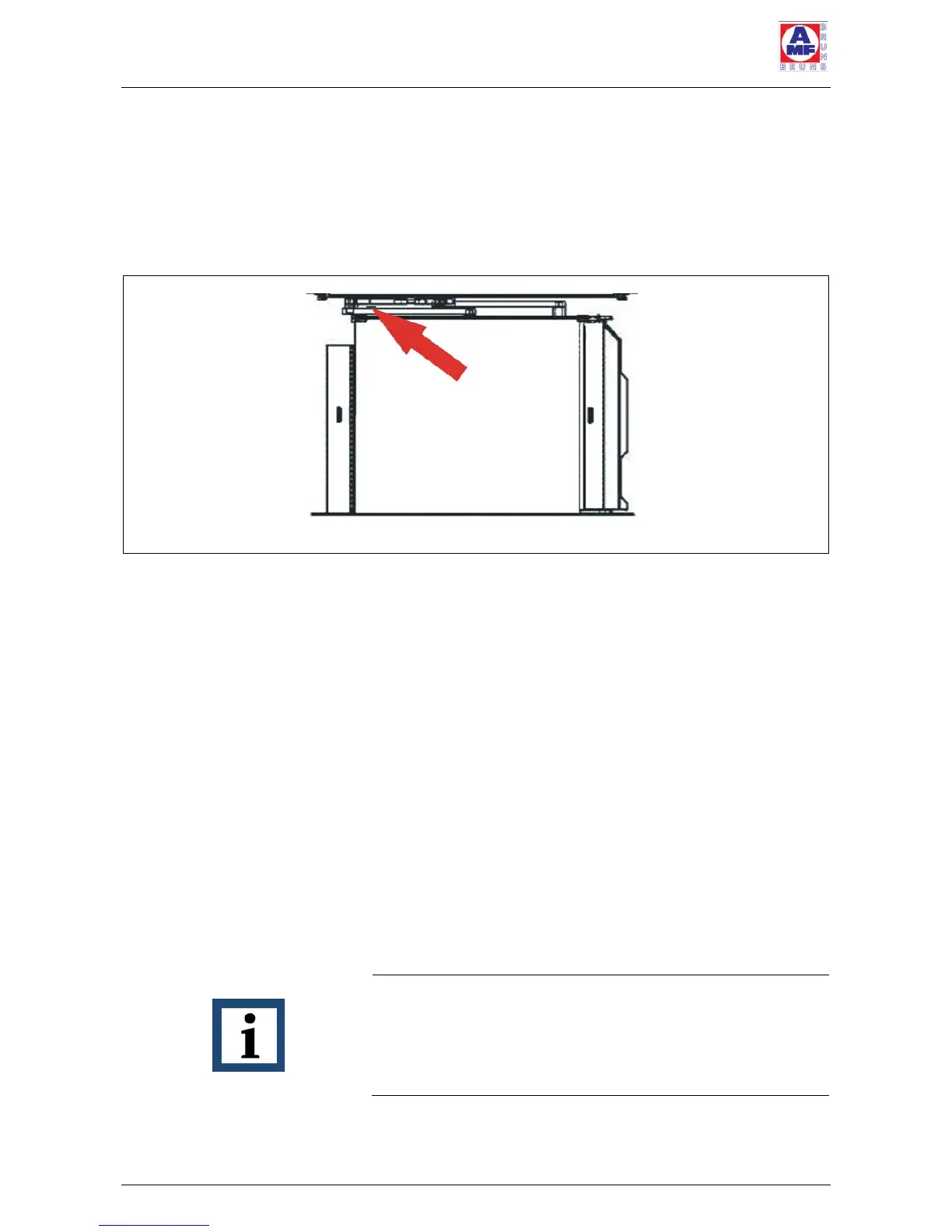
The switching point for the retract position is adjusted by
means of the switching cam on the left-hand carrier arm
(see Figure 48).
ð Fully extend the platform from the cassette (for the op-
erating controls: see Section 2.3, page 23).
ð Fully raise the platform.
ð Lower the platform to the retract position.
ð Retract the platform into the cassette.
ð Observe whether the platform is too high or too low
when it retracts into the cassette.
If the platform is too high when it retracts into the cassette:
ð Fully extend the platform from the cassette (for the op-
erating controls: see Section 2.3, page 23).
ð Lower the platform onto the ground.
ð Adjust the switching cam by hitting it lightly with a ham-
mer from below (see Figure 49, page 69). In order to
prevent damage to the switching cam, place an alumin-
ium block between the hammer and switching cam.
NOTE
Do not loosen the switching cam’s securing screw. If the
cam’s securing screw is loosened, the switching cam must
be completely re-adjusted and the Back-in-Box-Lift is no
longer operational.



 To Next Page