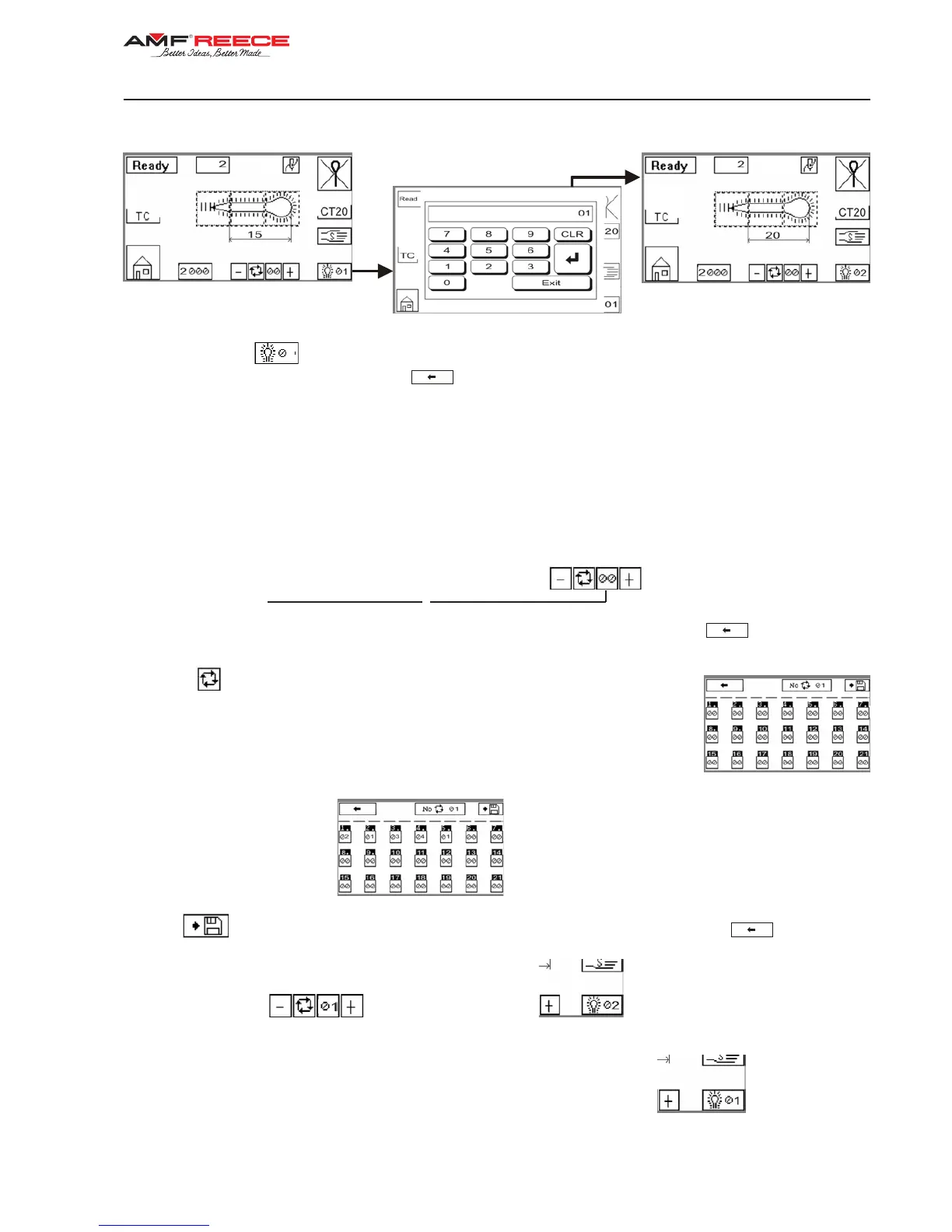
13. BUTTONHOLE PROGRAMMING
1. Press the button
1
in the right bottom corner on the screen.The numerical display appears on the screen.
Choose the buttonhole number 1 and press
.
2. Program the buttonhole shape according to the sections - D3, D4, D5.
3. Set buttonhole parameters will be automatically saved under the buttonhole number you have chosen.
Usage of the programmed buttonhole in the CYCLE MODE:
Example:
In the program number 1 you want to sew buttonholes in the following order: 2, 1, 3, 4, 1.
1. Press the button program number setting
The numerical display appears on the screen. Choose program number 1 and press .
2. Press button. The screen, where it is possible to set the order of sewn buttonholes,
appearsonthedisplay.Presstherstnumberandusingthenumericaldisplaysetthe
buttonhole number 2,whichwillbesewnastherst.PressENTtoconrm.Next,press
the second number to set the buttonhole number 1. Follow these steps to set all the
buttonholes which will be sewn. If 0isselected,thecyclemodewillreturntotherstset
buttonhole (2).
3. Press
to save the set buttonholes to program number 1. Return to the main screen .
4. Program number 1
and buttonhole number 2 whichwillbesewnasrstappearon
the display.
5. When the buttonhole is sewn, the number of the next buttonhole in the cycle (1)
will be displayed.


 To Next Page