PAGE 26
• LINEAR: Recommended for most aqueous solutions
• NATURAL WATER (not available for TDS measurement): Built-in temperature
properties table only for special applications — consult factory)
•TEMP TABLE: User-defined temperature table
• NONE: Measurement values are not compensated
NOTE: LINEAR is the factory default for temperature compensation with a 2.00% per °C
slope and 25.0°C reference temperature. This provides the best results for most
aqueous solutions. To enter different slope and reference temperature values for an
uncommon solution, refer to subheading “CONFIG LINEAR or CONFIG T-TABLE
Temperature Compensation” for details.
CONFIG CONC or CONFIG TDS Measurement (configuration not needed for conductivity)
Only when CONCENTRATION or TDS is selected must the transmitter be further
configured. If CONDUCTIVITY was selected, disregard this subsection — no measurement
configuration is needed.
CONCENTRATION Measurement Setup
Configure the transmitter with an appropriate table to convert measured conductivity into
displayed % concentration. If one of the transmitter’s BUILT-IN chemical concentration tables
matches the solution being measured, simply select that table. If not, you must create a USER-
DEFINED concentration table for the solution being measured.
Selecting BUILT-IN Chemical Concentration Table
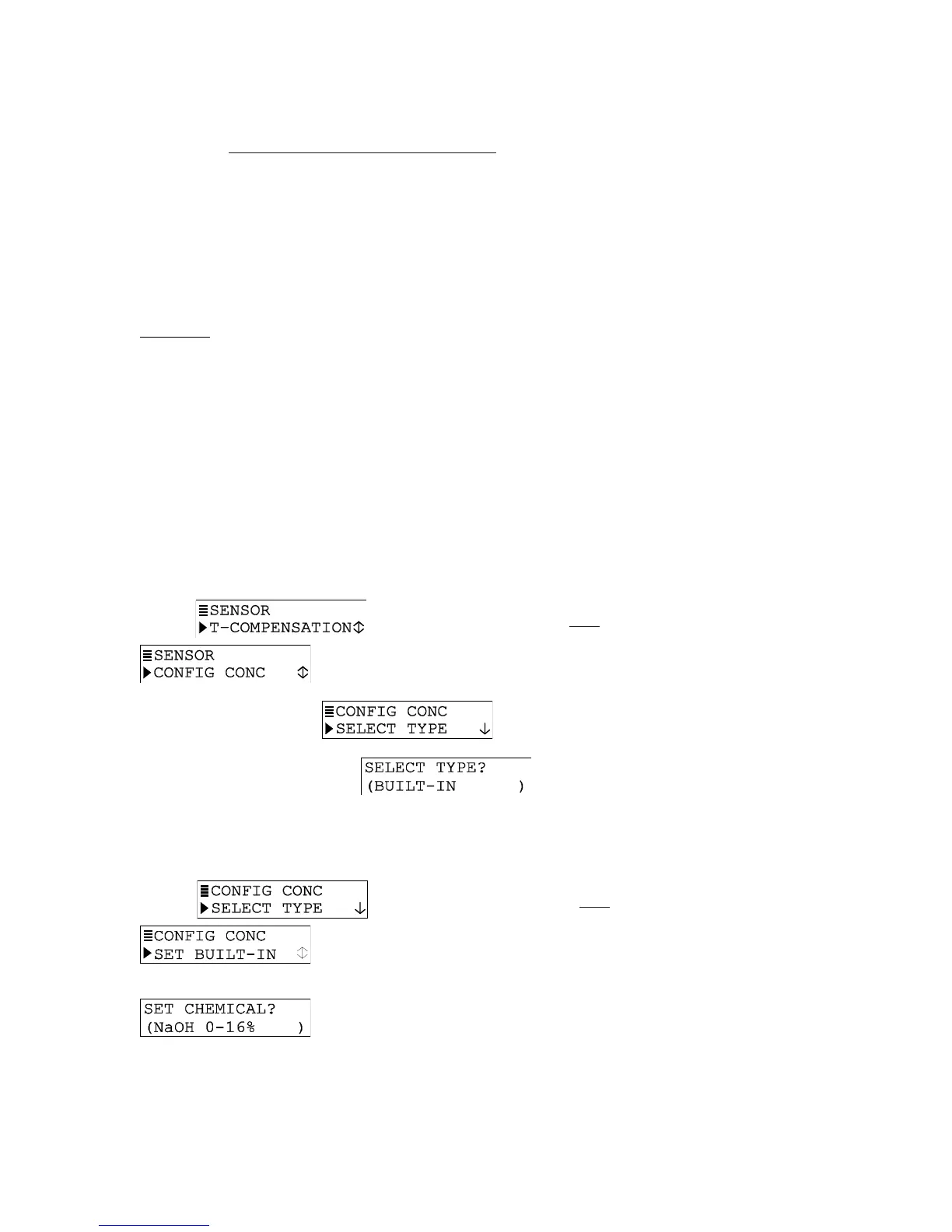
1. With the
screen displayed, press
ØØ
ØØ
Ø key once to display
.
2. Press ENTER key to display
.
3. Press ENTER key again to display
. BUILT-IN configures
transmitter to use one of the built-in chemical concentration tables. (If screen shows
USER-DEFINED, use
ØØ
ØØ
Ø and
××
××
× keys to select BUILT-IN.)
4. With “BUILT-IN” displayed, press ENTER key.
5. After the
screen re-appears, press
ØØ
ØØ
Ø key once to display
.
6. Press ENTER key to display a chemical table selection screen like
. Use
ØØ
ØØ
Ø and
××
××
× keys to select the chemical concentration
table that matches your solution, and press ENTER key to enter it:


 To Next Page