PAGE 30
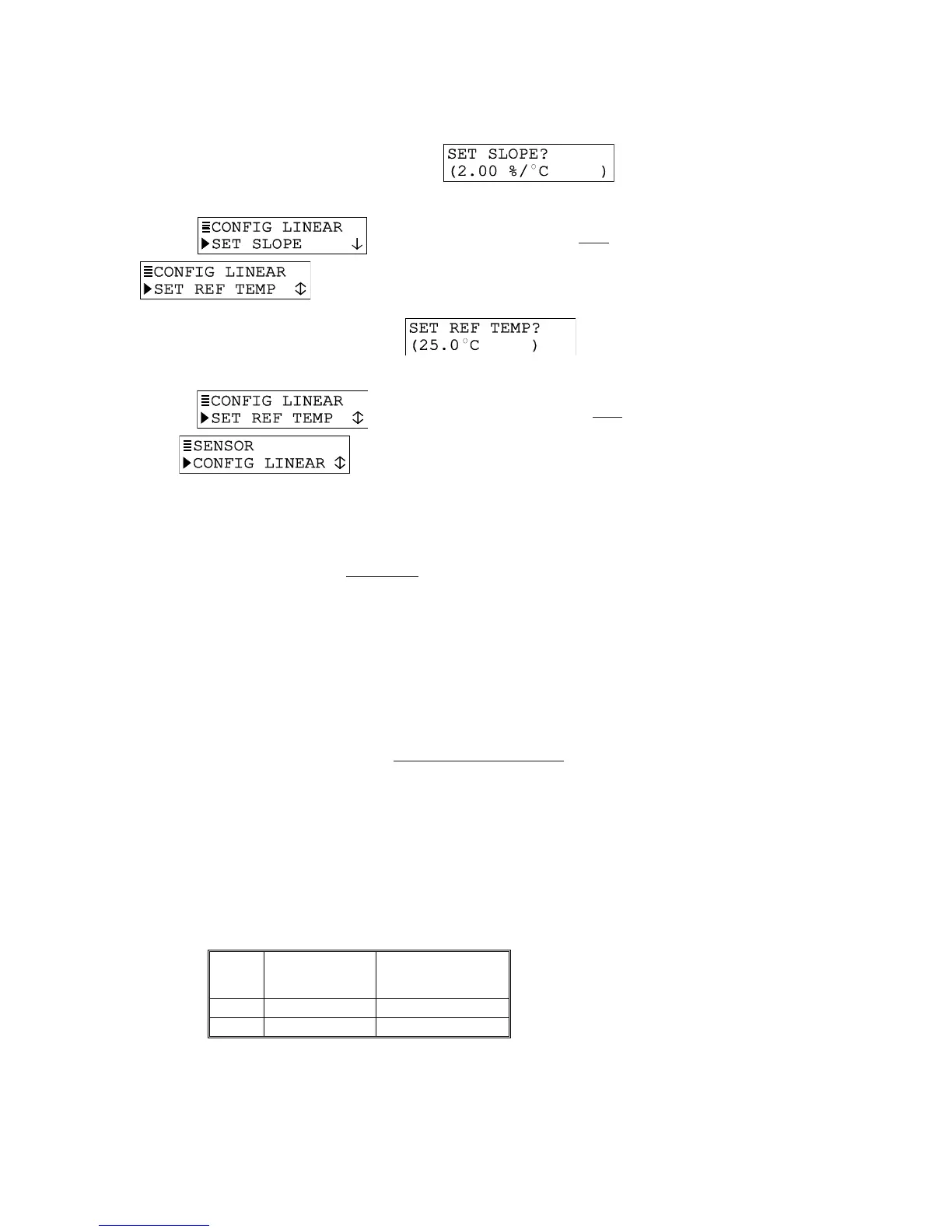
3. Press ENTER key again to display a screen like . Use
arrow keys to adjust to a desired slope, and press ENTER key to enter it.
4. After the
screen re-appears, press
ØØ
ØØ
Ø key once to display
.
5. Press ENTER key to display a screen like
. Use arrow
keys to adjust to a desired reference temperature, and press ENTER key to enter it.
6. After the
screen re-appears, press ESC key once to return
to the screen.
TEMP TABLE Compensation Setup
When special temperature compensation is required, you can create your own temperature
table to define the temperature compensation curve.
NOTE: The TEMP TABLE must contain at least two data points (Pt. 1 and Pt. 2) but can have
up to ten. (More points improve temperature compensation accuracy.) Each point
must have a temperature value coordinate (shown as X) and a corresponding ratio
coordinate (shown as Y). Temperature values must be between 0.0 and 200.0°C (or
32.0 and 392.0°F). Each entered temperature value must be different from all others.
Entered ratios, which are unit-less, must be between 0.00 and 99.99 and can have
the same value.
Use this equation to calculate the ratio value for each corresponding temperature
value:
Ratio Value (for each = Cond. Value at Ref. Temp.
corresponding temperature) Cond. Value at Noted Temp.
Example: Suppose the uncompensated or raw conductivity values are 100 mS/cm at a
25°C reference temperature, 120 mS/cm at 50°C, and 70 mS/cm at 15°C. Using this
equation, ratio values for each of the corresponding temperatures are:
For 25°C, ratio value = 100 / 100 or 1.00
For 50°C, ratio value = 100 / 120 or 0.83
For 15°C, ratio value = 100 / 70 or 1.43
The default TEMP TABLE is:
Data
Point
Temperature
Value (X
coordinate)
Corresponding Ratio
Value (Y coordinate)
Pt. 1
0.0
°
C
1.00
Pt. 2
100.0
°
C
1.00
To create your own TEMP TABLE, edit this default table and, if needed, add more data points.


 To Next Page