PAGE 31
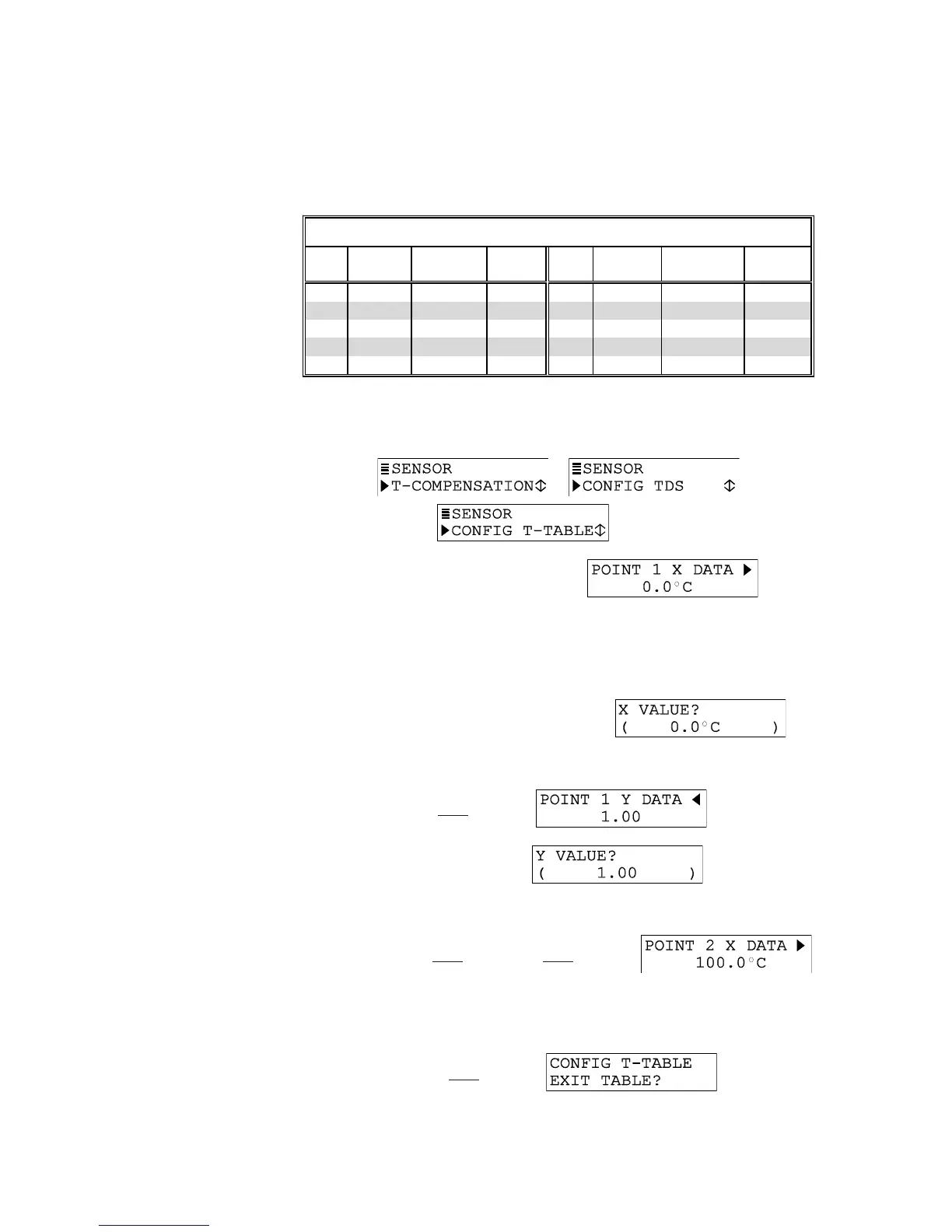
Recommendation: Before entering values, plan ahead and determine the temperature and ratio
values for each data point in your table. Use TABLE C to conveniently organize and note your
specific table entry values:
TABLE C -- Values for TEMP TABLE
Data
Point
°C Temp.
(X)
Raw
Cond.Value
Ratio
Value (Y)
Data
Point
°C Temp.
(X)
Raw
Cond. Value
Ratio
Value (Y)
Pt. 1 Pt. 6
Pt. 2 Pt. 7
Pt. 3 Pt. 8
Pt. 4 Pt. 9
Pt. 5 Pt. 10
1. With the or screen displayed,
press
ØØ
ØØ
Ø key until screen appears.
2. Press ENTER key to display a screen like
. Using this
screen and other similar data point screens, enter data to create your table:
NOTE: To switch between X and Y coordinate screens of a data point, use
ØØ
ØØ
Ø
and
××
××
×
keys. To
move between data points of an X or Y coordinate, use
ÕÕ
ÕÕ
Õ
and
ÖÖ
ÖÖ
Ö
keys.
A. Press ENTER key to display a screen like
. Use arrow
keys to adjust the Point 1 temperature to an appropriate value, and press ENTER
key to enter it.
B. Press
ÖÖ
ÖÖ
Ö key once to display .
C. Press ENTER key to display
. Use arrow keys to
adjust the Point 1 ratio to match the calculated value corresponding to the Point 1
temperature, and press ENTER key to enter it.
D. Press
ØØ
ØØ
Ø key once and
ÕÕ
ÕÕ
Õ key once to display .
E. Repeat steps 2A through 2D to enter the temperature and corresponding calcu-
lated ratio values for each remaining data point in the table.
F. After all X and Y coordinate values are entered for each data point in the table,
press ESC key
once to display .


 To Next Page