Instrument Overview 2-4 Interface Screen
Site Master User Guide PN: 10580-00252 Rev. K 2-9
Symbols and Indicators
The following symbols, icons, and indicators convey the instrument status or condition on the
display. The colors shown here are in the standard or default display mode.
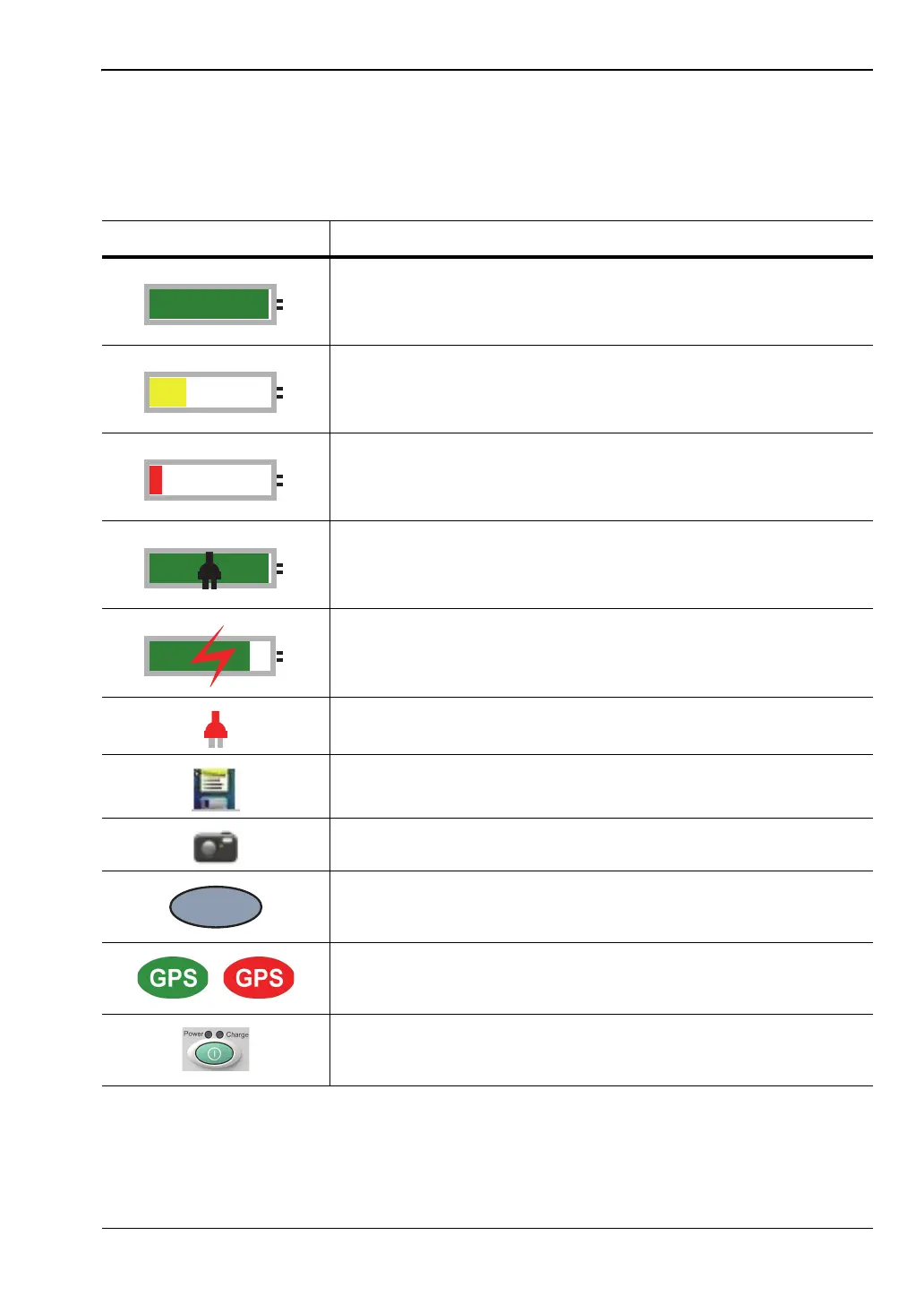
Table 2-1. Symbols and Icons
Symbol Description
Green: Battery is 30% to 100% charged.
Yellow: Battery is 10% to 30% charged.
Red: Battery is 0% to 10% charged.
Green with Black Plug body: Battery is fully charged and
external power is applied.
Lightning Bolt: Battery is being charged (any color symbol).
Red Plug body: External power is applied, and no battery is
installed, or battery has lost communications with the instrument.
Storage Icon: Tap the floppy disk icon to display the Save screen
and menu.
Camera Icon: Saves a JPEG image of the current screen display.
Shift Key Icon: This icon is displayed between the battery symbol
and the submenu keys after the Shift key has been pressed, and
until another key is pressed.
GPS Icon: This icon is displayed right after the date and time
when GPS is available. Refer to Chapter 6, “GPS (Option 31) ” for
details.
Power Button with Power LED and Charge LED: This is a
physical button with LED indicators. It is located near the numeric
keypad.











 To Next Page