DRAFT
September 25, 2007 1:07 am, 4376782_Install_to_a_Network.fm
Chapter 5 Connect the System to a Network
Monitor the Instrument
83
Applied Biosystems StepOne
™
and StepOnePlus
™
Real-Time PCR Systems
Installation, Networking, and Maintenance Guide
Notes
The StepOne
™
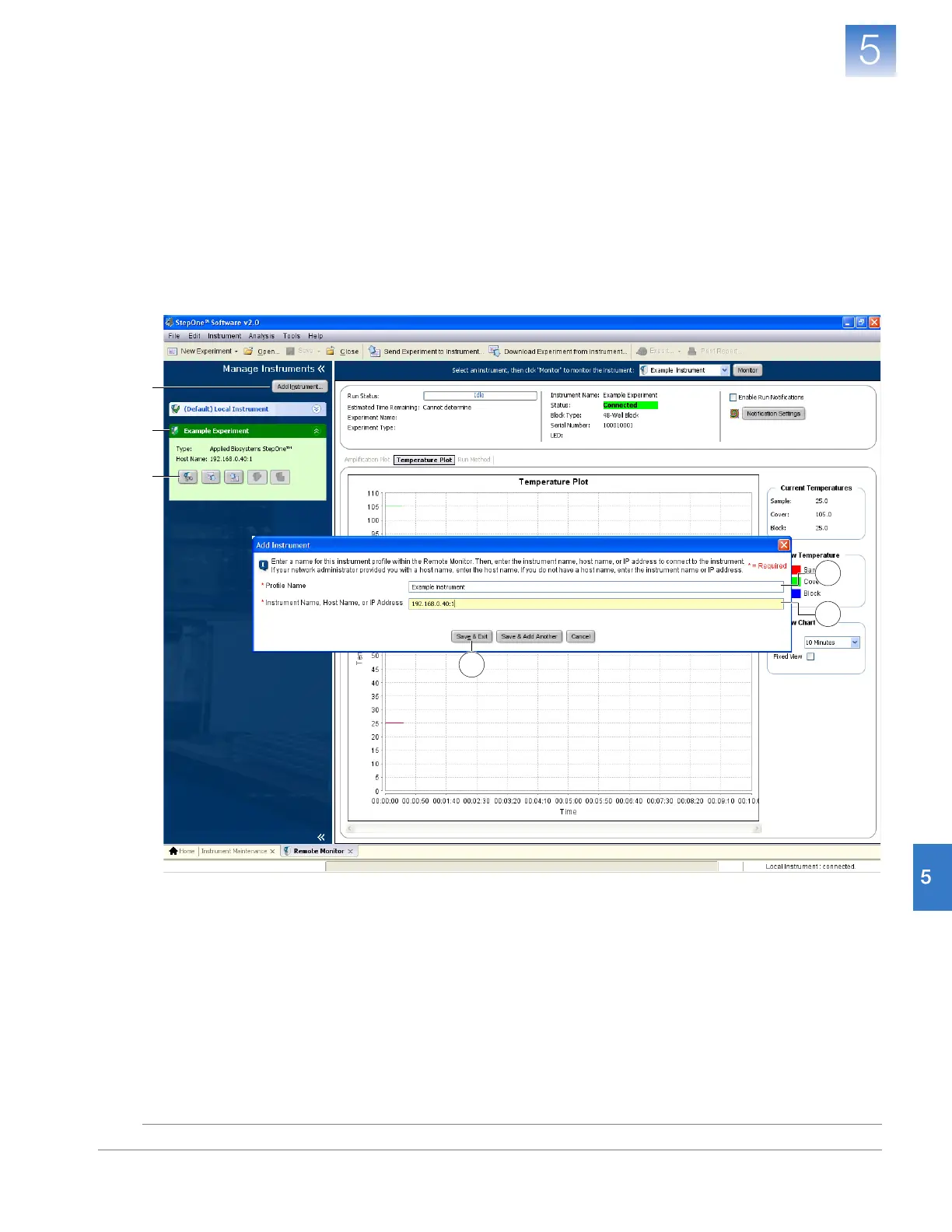
software displays the status, attributes, and plot data for the selected
instrument in real time. If a communications warning appears, troubleshoot the
problem as explained in “Network Connection Problems” on page 129.
You will lose the software connection to the colocated instrument if you:
• Change the instrument that is connected directly to your computer
• Use the colocated instrument touchscreen to change the instrument name or
IP address
To reestablish the colocated connection, restart the StepOne
™
software.
2
3a
3c
3b
4a
4b



 To Next Page