EN – 15
Install Bottom Cover
1. Reinstall bottom cover and secure with two tapping
screws and four hex bolts.
2. Models 921045, 921046, 921047, 921048, 921049,
921323, 921324: Advance to step 9.
Models 921326, 921328
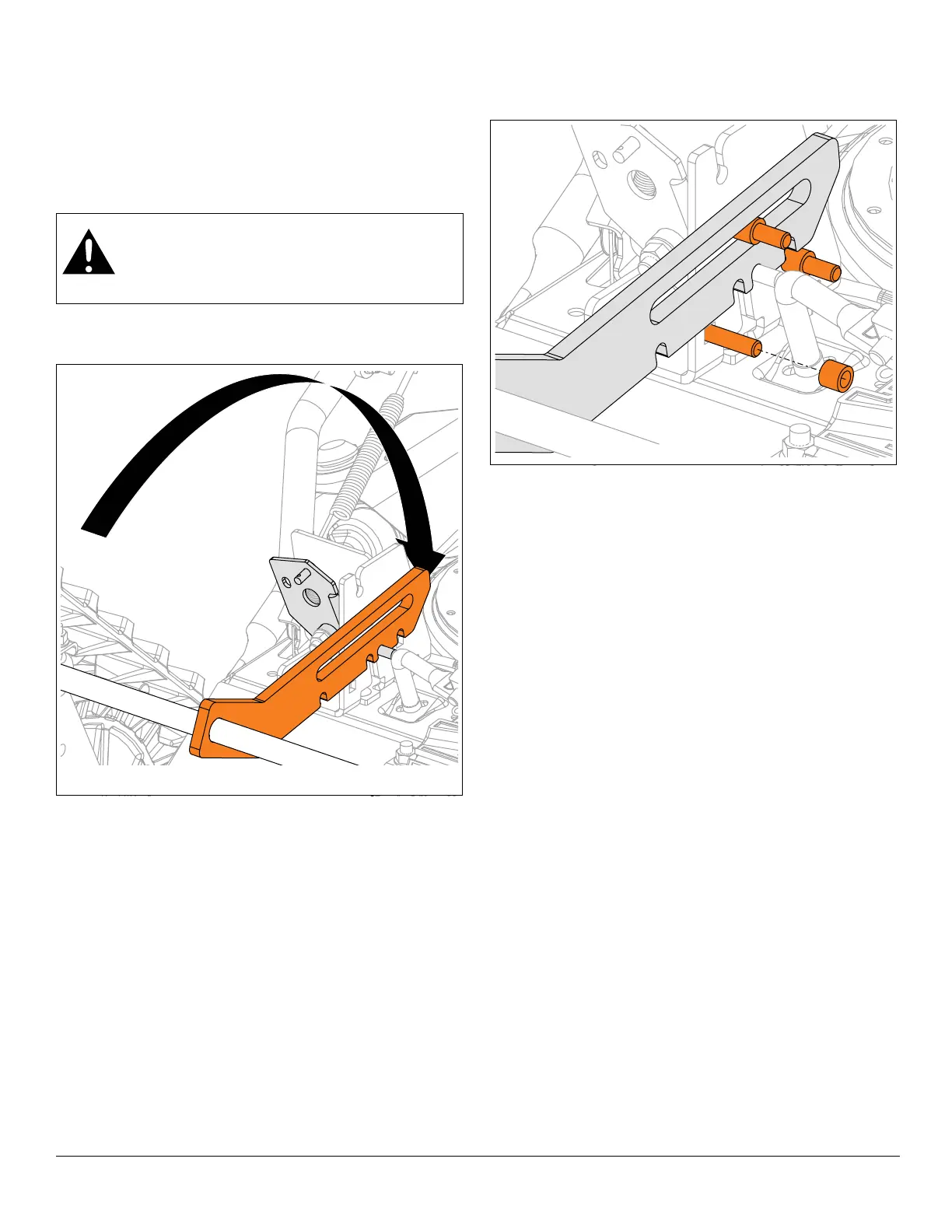
See Figure 23.
3. Support track carriage, rotate height adjuster stop to
original position and align with lock finger.
4. Reinstall three carriage bolts through height adjuster
bracket and reinstall spacers onto bolts. See
Figure 24.
See Figure 25.
5. Secure height-adjuster plate to carriage bolts with
three original flange nuts.
6. Reinstall cable eyelet onto lock finger and secure with
hairpin.
7. Reposition cable adjustment barrel into height
adjuster bracket and adjust cable. Refer to operator’s
manual for instructions.
8. Check adjustments after first use.
CAUTION: AVOID INJURY. Height adjuster is
unsecured until hardware is reinstalled. Be
careful not to bump adjuster from position on
lock finger. Keep hands away from pinch points.




 To Next Page